
🧾 A declaration becomes part of the release
Apple has said that, starting September 2026, a developer must indicate whether an app or game includes social media capabilities to submit a new version or update to the App Store, or to obtain notarization for distribution on alternative app marketplaces. The statement is short. Its operational consequence is not. A release that once looked like a build, a changelog, screenshots, and a submit button now has another product fact that needs an owner, evidence, and a repeatable answer.
For a small app business, this is not a reason to treat every product with a comment box as a social network. Apple provides a specific description: social media capabilities include the ability to redistribute, amplify, or interact with user-generated content through a social feed or a similar discovery method that visibly spreads content to many users. The practical work is to read that definition against what the app actually permits, rather than against the label a team gives itself.
- Requirement: Starting September 2026, the declaration is required for new versions, updates, and notarization for alternative app marketplace distribution.
- Scope: Apple’s notice applies to apps and games.
- Capability test: Apple describes redistribution, amplification, or interaction with user-generated content through a social feed or comparable discovery method that visibly spreads content to many users.
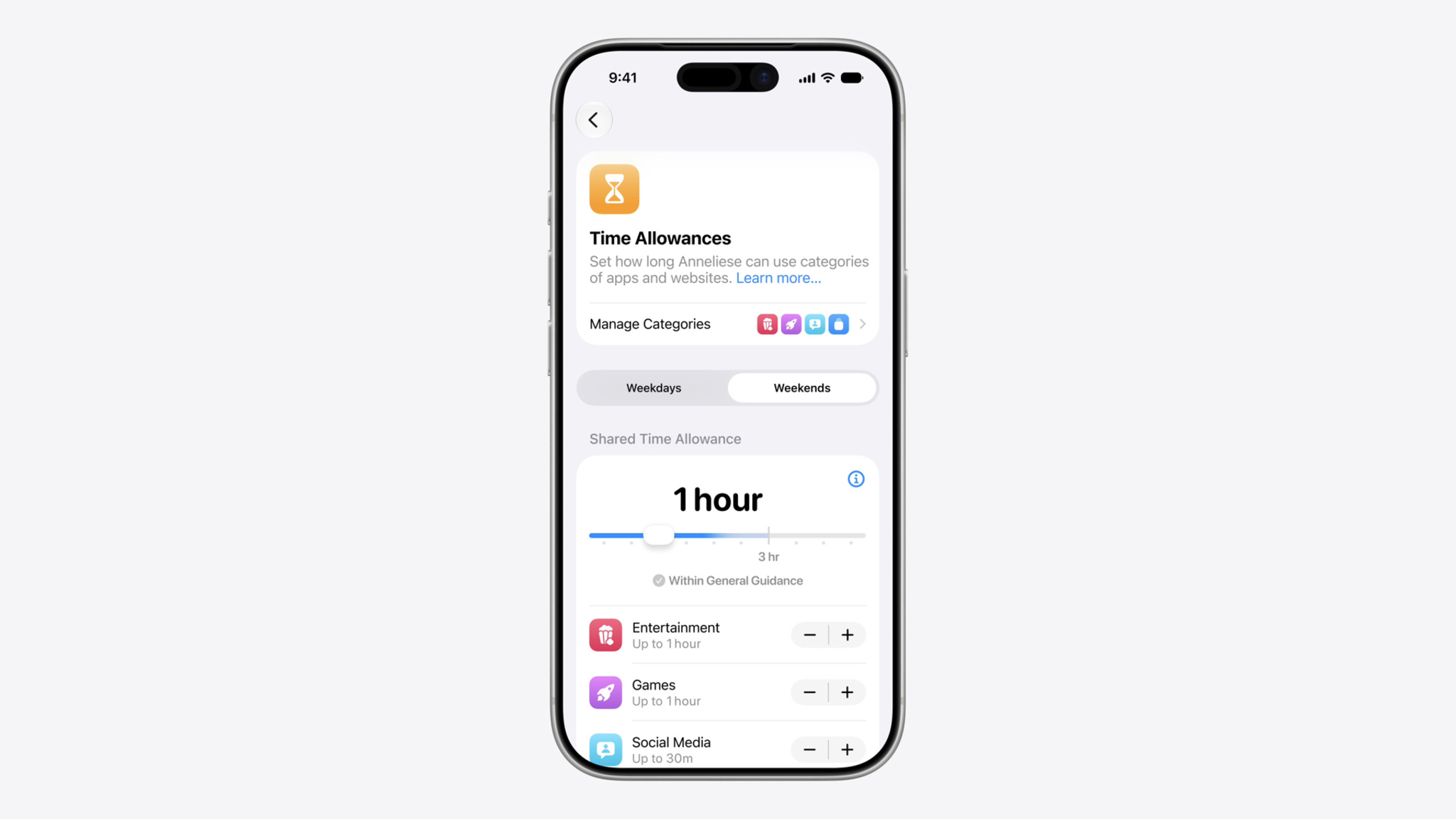
- Store outcome: An app indicated as having social media capabilities is placed in the Social Media Time Allowance category and receives a minimum age rating of 13+, subject to Apple’s stated exception for features disabled for users under 13.
- Metadata baseline: Apple says app information and metadata must be complete and accurate, and privacy responses must be kept accurate and up to date.
The useful framing is plain: App Store metadata is a representation of the shipped product. It is not clerical residue added after development. When product behaviour changes, the answers, review material, privacy disclosures, and public product page may need to change with it. A business that manages those items as release operations has a way to detect a mismatch before submission. One that handles them as a last-minute form is more likely to discover the mismatch when the release is already waiting.
🔎 What Apple is asking developers to identify
Apple’s wording does not offer a shortcut such as “select yes if users can communicate.” The description joins user-generated content with redistribution, amplification, or interaction through a social feed or comparable discovery method that visibly spreads content to many users. That calls for a feature-level review.
Ask what the app permits. Can a user publish material that others encounter? Can users react, share, repost, follow, or otherwise help it travel? Is there a feed, recommendation surface, activity stream, community board, discovery page, or similar interface designed to expose material to many people? Optional, gated, and server-configured features belong in that review too. The aim is a defensible account of the product, not a private reading of policy.
Apple distinguishes Time Allowance categories from App Store discovery categories. Entertainment and Games placement follows an app’s primary or secondary category. Social Media follows the capabilities indication. A “Productivity” or “Education” label does not settle the capability question.
The same Apple notice describes an under-13 path. If a developer indicates social media capabilities but says those capabilities are disabled for anyone under 13, the app is not included in the Social Media Time Allowance category for users under 13. Apple says the developer must also use the Declared Age Range API, at a minimum, to check users’ age ranges. The rest of the age-rating questionnaire still determines the age rating and may yield a rating below 13+. For users 13 and older, the app remains in the Social Media Time Allowance category.
That is a product and implementation statement, not a copywriting choice. A team should not select an under-13 condition because it sounds preferable on a product page. It should only make an answer that matches working controls, the app’s age-handling design, and the behaviour a reviewer can observe. Where the team cannot connect the declared state to the product, the response needs investigation before submission.
“Starting September 2026, you’ll be required to indicate whether your app or game includes social media capabilities in order to submit new versions or updates to the App Store, or for notarization for distribution on alternative app marketplaces.”
Apple Developer News
Apple’s reference material places this within a broader age-appropriate experience system. It says the age-rating questionnaire covers content descriptors, in-app controls, and capabilities, and Apple generates ratings from the answers. It also notes that age ratings can vary by operating-system version. A declaration should therefore be treated as one answer in a connected set, not as an isolated compliance field.
🧠 Metadata needs a product owner

A compact studio does not need a large compliance department to operate this well. It needs clear responsibility. The person who knows the feature set, the person who owns the release in App Store Connect, and the person responsible for privacy or backend changes must be able to compare notes before a build is submitted. In a two-person company, those may be the same person. The work still exists.
The strongest operating model treats the store record as a small, maintained product specification. It contains claims that need to agree: what the app does, what accounts can do, what users can post or see, what is disclosed in the age-rating questionnaire, what review notes explain, what data the app and its partners collect, and where the public privacy policy leads. These are different fields for different Apple workflows, but users and reviewers encounter them as a single product.
Apple’s App Review Guidelines tell developers to ensure that all app information and metadata is complete and accurate. They also ask developers to include detailed explanations of non-obvious features and in-app purchases in App Review notes, with supporting documentation where appropriate. That makes release notes a working tool. If a feature would be difficult for a reviewer to find, understand, or test, the submission package needs to state how it works and provide the access or resources required for review.
The guidelines also say an app with account-based features should provide full access through an active demo account or a fully featured demo mode, along with other necessary resources such as login credentials or a sample QR code. Backend services should be live and accessible during review. This is why metadata operations cannot be handed entirely to someone who only edits text. The submission needs facts from engineering, product, support, and operations.
🛠️ Build a release record before the form opens
The practical answer is a lightweight release record kept beside the normal delivery work. It can be a document, ticket template, or release checklist. What matters is that it records the product state being submitted, identifies changes since the last version, and assigns people to confirm the answers. A record built from the app’s actual features is more reliable than a collection of remembered answers copied from prior releases.
Start with a feature inventory. List user-generated content and identify where it is created, stored, displayed, and discovered. Capture interaction controls such as reporting, blocking, moderation, sharing, following, and messaging. Identify whether content is seen only by a defined participant group or is intentionally distributed through a social feed or similar discovery mechanism. Record the age-related controls available in the product. The aim is traceability, not a legal opinion hidden inside a spreadsheet.
Then compare the inventory with Apple’s age-rating questionnaire and social-media-capabilities description. Link each answer to evidence, such as a product requirement, screen recording, test account, or configuration reference. That makes later review and handoffs more reliable.
If a social function is gated or difficult to find, explain it in review notes and give the reviewer the access needed to see it. Apple does not promise approval because notes are thorough, but it identifies full access and detailed explanations as part of avoiding common submission problems.
This record should also cover distribution routes. Apple’s September requirement expressly includes notarization for alternative app marketplaces. Teams that ship through both the App Store and alternative distribution should avoid a separate, informal metadata process for one channel. The product capability is the same even where the delivery route differs. One shared source of truth reduces the risk that the team describes it differently in different submission flows.
🔐 Privacy, ratings, and the public product page

Apple’s privacy documentation is unusually direct about responsibility. Developers need to identify all data collected by them or their third-party partners unless it qualifies for optional disclosure. Apple defines third-party partners to include analytics tools, advertising networks, third-party SDKs, and other external vendors whose code has been added to the app. The developer is responsible for keeping the responses accurate and up to date. Apple says those answers can be updated in App Store Connect without submitting an app update.
That distinction is useful for small businesses. The privacy label should not wait for a binary release event if the underlying practice has already changed. A new SDK, a revised analytics event, a support tool, an account feature, or a server-side collection change can require a review of the disclosure. The App Store update is not the only moment metadata becomes operational.
Apple says that “collect” refers to transmitting data off device in a way that allows the developer or third-party partners to access it for longer than needed to service the request in real time. It gives developers a broad list of data types and asks them to understand how each type is used by both the developer and third-party partners. The listed purposes include third-party advertising, a developer’s advertising or marketing, analytics, product personalization, app functionality, and other purposes. A team should map the product’s actual flows before it starts selecting labels.
The connection to social features can be direct. Apple says in-app private messaging that is not SMS must be declared as emails or text messages on the privacy label. It says generic free-form text fields should be represented as Other User Content, while a specific request for a named data type requires disclosure of that type. “We are not a social app” is not a privacy process.
Age ratings are also public-facing. Apple says the rating is a required app-information field used by parental controls. Its Kids guidance says a product page can show the rating, content frequency, In-App Purchases, the privacy nutrition label, and labels for controls, age assurance, user-generated content, messaging, and advertising. These declarations help customers and parents make product choices.
Why it matters: The social-media declaration should be reviewed with the age-rating and privacy answers because all three describe aspects of the same app. A mismatch can mislead users, leave a reviewer without needed context, or force the team to untangle product facts during a submission window.
Apple’s Kids materials add a further constraint for products in the Kids category. The company says Kids apps should not transmit personally identifiable information or device information to third parties, even in sections intended for adults, unless a parent explicitly consents. It says advertising shown in such apps must be human-reviewed for age appropriateness. The App Review Guidelines add requirements for the category, including parental gates for links out, purchasing opportunities, and other distractions to children, subject to the stated rules. These are not generic rules for every app, but they illustrate how a category decision, a feature, a data practice, and a public disclosure can meet in one release.
👥 Social features require operating controls
The September declaration does not create Apple’s user-generated-content rules. Those rules are already in the App Review Guidelines, and they tell a small business what social functionality entails after it has shipped. Apple says apps with user-generated content or social networking services must include a method for filtering objectionable material, a mechanism to report offensive content and timely responses to concerns, the ability to block abusive users, and published contact information so users can easily reach the developer.
Those requirements mean that a social feature should have operational owners. Someone needs to know how reports enter the system, who has authority to act, how blocking works, what support contact is visible, and whether the product’s controls match the description given in submission material. A policy page alone does not provide filtering or blocking. A button alone does not ensure that concerns receive timely responses. Apple’s guideline describes capabilities and a response obligation, so the team should design both the interface and the operating path.
Apple also says it is the developer’s responsibility to remove content that violates the guideline, its terms of service, or its community standards. If Apple finds such content, it may ask the developer to remove it and provide a plan to improve compliance. Apple says the app may be removed until improvements can be demonstrated, and that egregious or repeated behaviour can lead to immediate removal from the App Store and the Apple Developer Program. This is a reason to avoid launching a community mechanism with no credible moderation plan.
For creator-content apps, Apple says creators may author, share, and monetize user-generated experiences, but those experiences must not change the core features and functionality of the native app. The content is treated as user-generated content by App Review. Apple further says creator apps must let users identify content that exceeds the app’s age rating and use an age restriction mechanism based on verified or declared age to limit access by underage users. A studio adding creator tools needs to treat those details as product requirements, not a future support project.
📋 A release checklist that survives team size

A useful checklist is short enough that the team uses it and detailed enough to expose changes. It should be completed for every new version or update, including a minor release when a remote configuration, SDK, or backend adjustment changes what users can do or what data is handled. Its function is to turn a policy requirement into a stable release habit.
- Freeze the product facts. Identify the build, enabled server-side features, account states, countries or regions relevant to the release, and any changes since the prior submission.
- Review social functionality. Compare user-generated-content paths, feeds, discovery surfaces, redistribution, amplification, and interaction against Apple’s description of social media capabilities. Record the answer and the evidence behind it.
- Check age-rating answers together. Confirm content descriptors, in-app controls, messaging, advertising, user-generated content, unrestricted web access where applicable, and the social-media-capabilities response against the current product.
- Test the declared controls. If functionality is said to be disabled for users under 13, verify the experience and the age-range handling that supports the declaration. Do not treat a design intention as a working control.
- Review privacy collection. Check first-party collection and every third-party partner, including analytics tools, ad networks, SDKs, and external vendors. Update App Store Connect responses when practices have changed.
- Read the public page. Check that the description, screenshots, age rating, privacy policy URL, and other customer-facing information do not contradict the app that will ship.
- Prepare review access. Provide a working demo account or demo mode for account-based functionality, turn on needed backend services, and supply credentials or other resources that App Review needs.
- Write review notes for the unusual path. Explain non-obvious features, gated flows, and in-app purchases, and point the reviewer to the route needed to test them.
- Confirm the distribution route. Apply the social-media declaration process to new versions, updates, and notarization where the team distributes through alternative app marketplaces.
- Keep the record. Save the final answers, evidence, reviewer instructions, and the person who approved each area. Use that record as the starting point, not the automatic answer, for the next release.
If the answer is uncertain, pause the metadata decision and clarify the product facts before submitting. Apple says its before-you-submit list does not replace the guidelines or guarantee approval. The value is narrower: it reduces gaps between the product, the submission, and the public product page.
⚠️ Where small teams make avoidable errors
The most common error is answering from a product label. “It is a fitness app,” “it is a game,” or “it is a marketplace” does not resolve whether users redistribute, amplify, or interact with user-generated content through a social feed or similar discovery method. Apple separates the Social Media Time Allowance determination from category selection. Feature inspection beats category shorthand.
Another error is reviewing only the current code change. A feature flag, moderation configuration, SDK, or server process can alter the app experience or data practice. The release record should capture the product state that supports store answers.
Teams also sometimes divide the form fields too sharply. A product manager answers the age questionnaire, an engineer adds an SDK, and a marketer updates the description. Each task can be reasonable in isolation. The failure occurs if no one checks whether the combined product page is still true. Apple says developers are responsible for their app’s compliance, including ad networks, analytics services, and third-party SDKs. That is a strong reason to keep a shared review point.
Privacy disclosures are especially vulnerable to stale assumptions. Apple says an app’s privacy practices should follow the App Review Guidelines and applicable laws, and that responses must stay accurate and current. It also says data collected for app functionality still needs to be declared when the collection meets its definition. “We only use it to make the feature work” is not a substitute for examining the disclosure rules.
A further error is treating reviewer access as administrative cleanup. When a feature requires an account, a particular role, content created by another user, or a special device flow, a reviewer needs a workable way to see it. Apple explicitly asks for full access, including demo credentials or a fully featured demo mode where accounts are involved. Review notes should explain non-obvious functionality rather than leaving a reviewer to reconstruct the product’s path.
Finally, teams can overstate a safeguard. An age gate that exists in a design document, a moderation queue with no owner, or a disabled feature that is still reachable through another route should not be represented as a settled product fact. The durable practice is to test the condition, retain evidence, and fix the product or the declaration when they differ.
🎯 Treat the next submission as an operating rehearsal
September 2026 is a clear trigger to put this work on the calendar, but the durable change is broader. Every release should leave the company with a coherent statement of what the product does, who can encounter it, what controls apply, what data moves off device, and how a reviewer can verify the answers. Apple’s new declaration makes that discipline visible. The surrounding App Review, age-rating, privacy, and kids guidance shows that it has been part of responsible App Store operations all along.
For a small app business, the next move is to audit the current version before the next submission. Map user-content and discovery features. Review the age-rating questionnaire as a connected set of answers. Inventory data collection by the app and its partners. Confirm the public privacy policy URL and test the reviewer path.
That work produces a better internal account of the product, a clearer public page, and a disciplined handoff between development and distribution. The App Store listing becomes an operational surface that changes when the product changes.
Sources: https://developer.apple.com/news/?id=0d2gpmml · https://developer.apple.com/help/app-store-connect/reference/age-ratings/ · https://developer.apple.com/app-store/review/guidelines/ · https://developer.apple.com/app-store/app-privacy-details/ · https://developer.apple.com/news/upcoming-requirements/ · https://developer.apple.com/kids/


