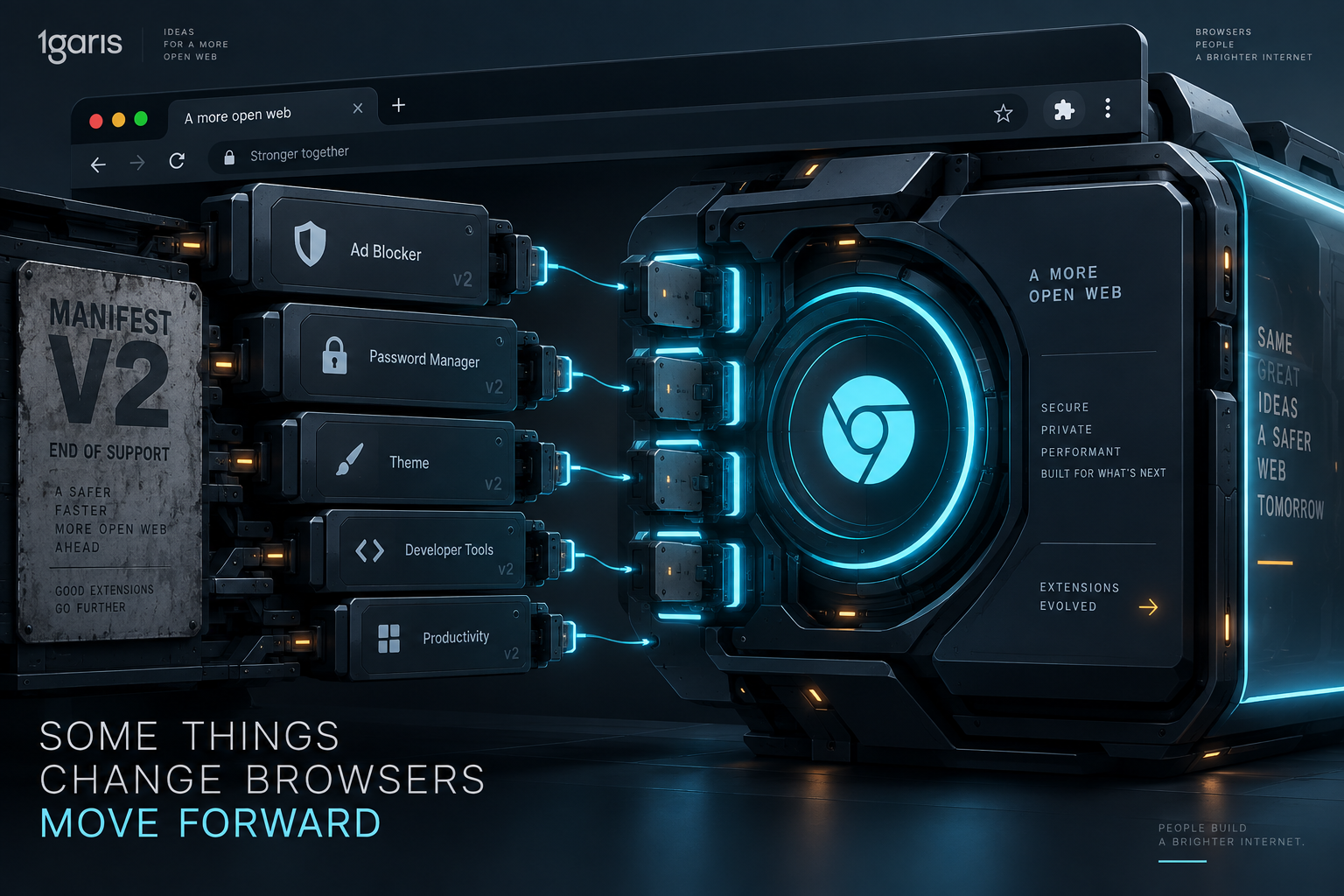
🛑 The Chrome Web Store closed the door on legacy extensions
On August 31, 2026, Google executed the final phase of its multi-year extension deprecation by permanently deleting every remaining Manifest V2 extension listing from the Chrome Web Store catalogue and search index. The purge brought an end to an transition timeline that began in 2018 when the Manifest V3 specification was first published. For casual browser users, the event registered primarily as the disappearance of older ad blockers, notably the original build of uBlock Origin. Yet behind the headlines about content filtering lies a profound structural change in how modern web browsers interact with client devices, network requests, and external code.
The Chrome Web Store is not merely an optional marketplace for Google Chrome. It serves as the primary distribution channel for the broader Chromium ecosystem, supplying extensions to millions of users on Microsoft Edge, Opera, Vivaldi, and various enterprise Chromium builds. When Google unlisted all remaining Manifest V2 extensions, it severed the installation and recovery path for thousands of developer utilities, custom internal business extensions, accessibility tools, and privacy guards. Extensions that remain installed on older browser releases will continue to function in their current state, but they are now permanently frozen software. They cannot receive updates, security patches, or bug fixes from the official store. Once an employee uninstalls one of these legacy extensions, cleans their user profile, or migrates to a newly provisioned laptop, the extension cannot be retrieved from Google's repository.
This milestone marks a decisive shift in browser philosophy. Under Manifest V2, the browser trusted third-party extensions with broad, persistent programmatic authority over every piece of network traffic passing through the client. Manifest V3 replaces that programmable inspection with an architectural model where the browser itself evaluates declarative rules inside its own core engine. The browser no longer allows arbitrary JavaScript to intercept, parse, and modify HTTP headers on the fly. Instead, extensions must register precompiled rule lists, accepting hard numerical quotas and structural constraints in exchange for tighter privacy boundaries and predictable resource consumption.
Understanding this transition is essential for web developers, small business teams, and digital agencies. The demise of Manifest V2 is not an isolated consumer dispute over online advertisements. It touches internal workflow automation, enterprise browser security policies, custom web scrapers, customer analytics tag resilience, and the fragile dependencies modern teams place on browser-based tools. A digital storefront or web application does not live in an abstract vacuum; it operates in the real browsers that customers, staff, and partners use every working day.
📊 A compact snapshot of the Manifest V2 sunset
The migration away from Manifest V2 has been one of the longest and most contested infrastructure transitions in the history of the web platform. Because extensions have evolved from simple aesthetic novelties into business-critical enterprise tools, changing the foundation beneath them required balancing severe security risks against developer autonomy.
- August 31, 2026: Google completed the total purge of all Manifest V2 extension listings from the Chrome Web Store index and public catalogue, cutting off all new installations and developer updates.
- Chrome 138 and Earlier: Existing unmanaged installations of Manifest V2 extensions remain running locally in a frozen state, but cannot receive patches, rule updates, or store reinstallations.
- Chrome 139 and Later: Manifest V2 support is permanently disabled across stable consumer channels, rendering legacy extensions non-functional on up-to-date installations.
- Chromium Ecosystem Impact: Chromium-based browsers that rely on the Chrome Web Store lose direct catalogue access to legacy tools, prompting specific vendors like Brave to self-host selected legacy extensions on dedicated backends.
- Declarative Rule Cap: Manifest V3 replaces unrestricted request listeners with
declarativeNetRequest, imposing strict limits of 5,000 dynamic and session rules alongside precompiled static rulesets. - Execution Lifecycle: Long-running background pages that held state indefinitely in memory are replaced by ephemeral Service Workers that terminate when idle.
This timeline demonstrates that the retirement of legacy web standards is rarely sudden, but its final cutoff is unforgiving. Teams that ignored deprecation notices during the multi-year grace period now find themselves managing unsupported client extensions across internal workstations. Recognizing the architectural differences between the old and new models is the prerequisite for building stable web operations in 2026.
⚙️ How declarativeNetRequest replaces arbitrary request inspection
The fundamental technical divergence between Manifest V2 and Manifest V3 sits within the networking layer. In the legacy Manifest V2 architecture, an extension achieved content filtering, security scanning, or request modification by registering listeners through the chrome.webRequest API. When a webpage initiated an HTTP or HTTPS request, the browser paused the network pipeline and passed control to the extension's persistent background page. There, the extension executed arbitrary JavaScript code to inspect the full URL, request headers, cookies, and destination before deciding whether to allow, redirect, or block the connection synchronously.
This design gave developers immense flexibility. A sophisticated extension could execute complex string manipulation, evaluate regular expressions against dynamic heuristics, query an external database, or maintain intricate state machines across user navigation. However, this same flexibility created two severe systemic flaws: performance degradation and pervasive security exposure.
Every time a webpage loaded dozens of stylesheets, fonts, tracking pixels, scripts, and API payloads, each individual request had to cross the inter-process boundary between the browser network stack and the extension runtime. If an extension's background script contained inefficient logic or blocked on a complex calculation, user navigation stalled. More dangerously, an extension granted blocking access to chrome.webRequest gained the technical capability to read every packet of data transmitted by the user, including authentication session tokens, personal identities, and sensitive payloads. Even when an extension developer had no malicious intent, a single compromised third-party dependency inside an extension could silently turn it into a credential harvesting vector.
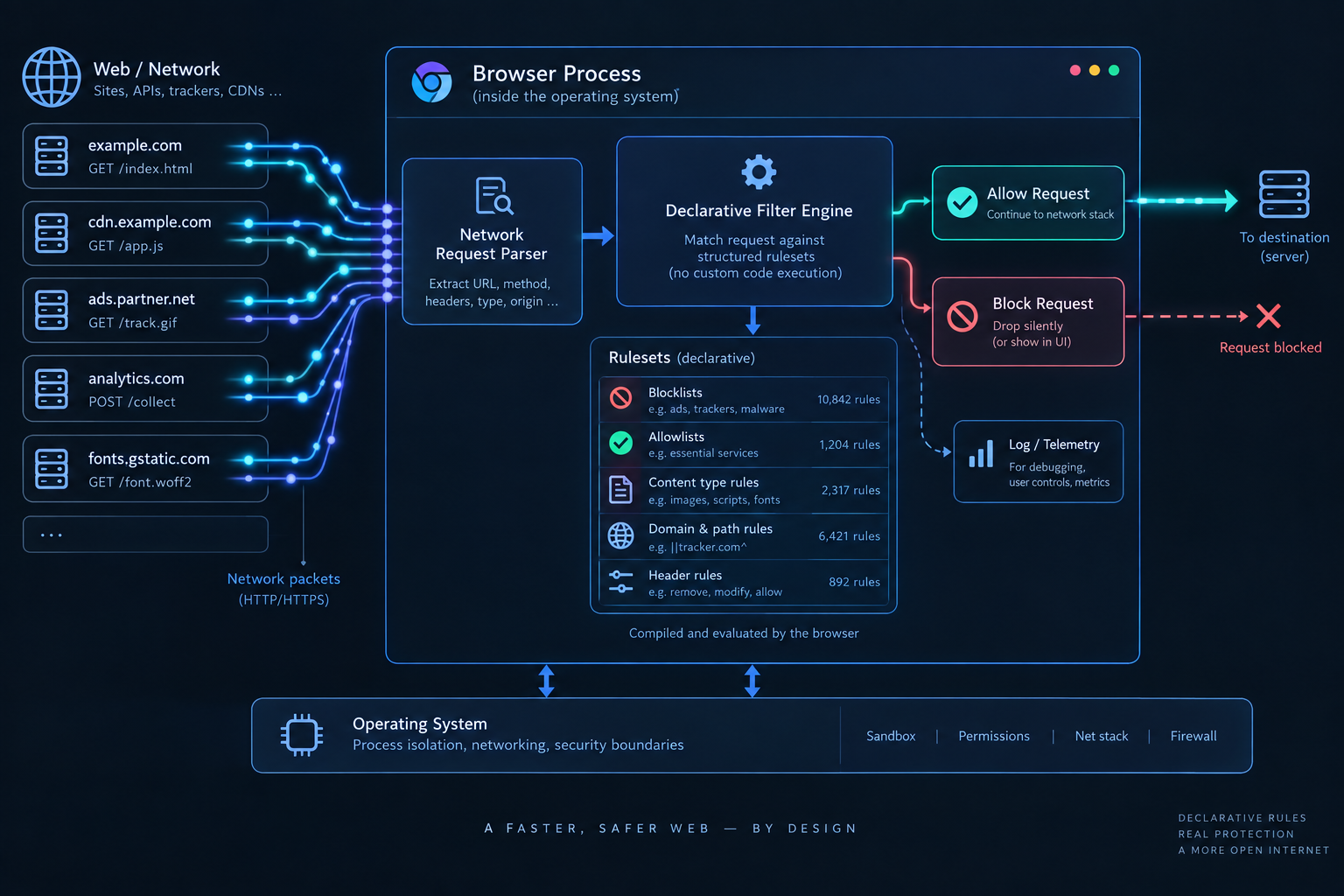
Manifest V3 replaces this mechanism with the declarativeNetRequest API. Under this paradigm, the extension does not touch the live network request at runtime. Instead, the extension provides a structured list of declarative filtering rules ahead of time. These rules define conditions (such as URL patterns, resource types, and domain restrictions) and corresponding actions (such as block, allow, or modify headers). When the browser processes network traffic, its internal C++ engine evaluates these declarative rules directly within the networking process.
Manifest V2 (Procedural):
Browser Network Stack -> Extension JS (webRequest) -> Evaluate Code -> Allow / Block / Modify

Manifest V3 (Declarative):
Extension -> Registers Static / Dynamic Rulesets -> Browser C++ Engine Evaluates In-Kernel
Because rule evaluation takes place natively inside the browser, network requests are processed at native speeds without invoking an external JavaScript engine for every URL. However, this speed comes with strict functional boundaries. The browser limits each extension to a finite budget of rules: typically 5,000 dynamic rules that an extension can adjust at runtime, alongside bundled static rulesets that must be enabled or disabled wholesale. Extensions can no longer make open-ended decisions based on the dynamic context of a live request; they must fit their logic within the declarative vocabulary supported by the browser engine.
🔒 The security trade-off between user protection and developer control
The debate surrounding the Manifest V2 retirement has frequently been framed as an adversarial clash between browser vendors seeking ad revenue and privacy advocates protecting consumers. While commercial incentives inevitably influence platform decisions, the underlying engineering reality is rooted in computer security and access control.
In the early eras of the web, extensions operated as trusted plugins with near-complete administrative rights over the browser window. Over the past decade, that permissive model became unsustainable. Malicious actors routinely purchased abandoned Chrome extensions that had amassed large user bases, pushed silent updates containing malicious data-stealing payloads, and weaponized existing webRequest permissions to intercept banking sessions and private form submissions. Because Manifest V2 allowed persistent background pages to run indefinitely, malicious code could maintain active command-and-control communication while staying hidden from typical desktop antivirus software.
Manifest V3 implements least-privilege architecture across three core dimensions:
- Elimination of Remote Code Execution: Manifest V3 strictly prohibits extensions from executing remotely hosted JavaScript code. All executable logic must be bundled inside the extension package verified during Chrome Web Store review. This prevents attackers from modifying an extension's behavior on the fly after passing security audits.
- Ephemeral Service Workers: The permanent background page is abolished. Extensions must now run as background service workers that wake up to handle specific events (such as a tab opening, an alarm firing, or a message arrival) and shut down when idle. This architectural change drastically reduces browser memory consumption and eliminates lingering background processes.
- Restricted Storage and Scoped Permissions: Data access must be requested with fine-grained specificity, preventing extensions from claiming broad host permissions without demonstrating clear functional necessity.
Yet every security boundary introduces operational trade-offs. By replacing dynamic programmatic interception with predefined declarative rules, Manifest V3 deliberately restricts the expressive power available to software engineers. Highly granular diagnostic utilities, corporate security forensics tools, specialized accessibility screen-readers, and advanced research proxies that required programmatic payload inspection find themselves either severely constrained or forced into hybrid native applications.
For small businesses and independent web developers, the lesson is clear: convenience and absolute programmatic control frequently carry latent security liabilities. When evaluating internal browser tools, teams must weigh the immediate utility of an extension against the privileged surface area it demands on corporate endpoints.
📉 Why content blockers and analytics tags face new rules
Content filtering tools such as ad blockers, script blockers, and tracking protection suites are the most visible casualties and adapters of the Manifest V3 transition. Because content blockers rely on extensive community-curated blocklists (such as EasyList, EasyPrivacy, and Peter Lowe's ad servers), fitting dozens of thousands of rules into the browser's declarative quotas required complete structural redesigns.
Modern Manifest V3 blockers, such as uBlock Origin Lite and AdGuard MV3, demonstrate that effective content blocking remains entirely possible under the new system, but the user experience and operational mechanics have changed. Under Manifest V3:
- Static Rulesets vs Dynamic Filtering: The vast majority of filtering rules must be compiled into static JSON rulesets bundled with the extension. While these rules block known advertising networks and tracking domains instantly with negligible CPU overhead, users cannot easily inject complex custom exceptions on the fly without consuming their limited dynamic rule quota.
- Rule Quotas: Browsers enforce global limits across all installed extensions to prevent misbehaved packages from overloading the browser's rule-matching memory tables. If an organization installs multiple security extensions that each attempt to register dynamic rules, they may encounter rule exhaustion errors.
- Update Latency for Filter Lists: In Manifest V2, content blockers could download fresh filter lists daily or hourly from remote servers to combat evasive advertising scripts. In Manifest V3, updates to static rulesets require publishing an updated extension package through the Chrome Web Store review queue, introducing latency between the emergence of a malicious domain and the deployment of a browser rule to block it.
Content Blocking Architecture Comparison:

Feature                     Manifest V2                 Manifest V3
Rule Evaluation             JavaScript Runtime          Browser C++ Engine
Performance Overhead        Variable / High             Predictable / Low
Dynamic Rule Capacity       Virtually Unlimited         Capped (5,000 Dynamic Rules)
Filter List Updates         Instant Remote Fetch        Store Package Release Cycle
Network Payload Access      Full Request Inspection     No Payload Inspection
This structural shift also impacts website owners and digital marketing teams. Over the past five years, many commercial websites complained that aggressive client-side blockers broke essential site features, such as checkout modals, authentication single-sign-on flows, and legitimate customer service chat widgets. Because Manifest V3 blockers operate primarily through standardized declarative rules rather than unpredictable runtime DOM and script mutations, content filtering has paradoxically become more standardized.
At the same time, website owners must recognize that user privacy expectations have matured. Relying on heavy, invasive third-party tracking pixels that trigger declarative blocklists will degrade site performance and visitor trust. Modern web teams should prioritize first-party analytics architectures and server-side tagging, ensuring that tracking respects user consent while avoiding brittle client-side script wars.
💼 The risk of frozen software in daily business operations
For non-technical business operators, the disappearance of legacy extensions from the Chrome Web Store might seem like an abstract developer concern. In reality, it represents a substantial operational vulnerability known as the "frozen software trap."
Over the past decade, thousands of small and medium-sized enterprises developed or adopted specialized browser extensions to streamline daily operations. These tools include:
- Custom CRM and ERP data-entry assistants that scrape internal portals to populate order fields.
- Automated web scraping tools used by market researchers and real estate teams to monitor local competitor prices.
- Specialized document signing, PDF annotation, and local receipt printing extensions for point-of-sale hardware.
- Developer QA tools, API header injectors, and cookie management suites used by agency developers during client staging reviews.
Many of these utilities were built by contractors or acquired from small third-party vendors who never invested the engineering hours required to migrate to Manifest V3's Service Worker architecture. As of September 2026, these unmigrated extensions have entered a state of irreversible stagnation.

Consider the mechanics of the frozen software problem:
- Zero Maintenance: An unmigrated extension running on an employee's machine cannot receive bug fixes. If a SaaS provider changes the HTML layout of an administrative portal, a legacy automation extension will break, and the developer has no mechanism to push an updated build through the official store.
- Silent Vulnerabilities: If a security flaw is discovered in an underlying library used by a legacy extension, that vulnerability remains permanently unpatched on every machine where the extension is running.
- The Single-Point-of-Failure Disaster: When an employee upgrades their workstation, replaces a damaged laptop, or accidentally clicks "Remove from Chrome" in
chrome://extensions, the extension is gone forever. The Chrome Web Store will return a 404 error, leaving the business without the tool it relied on to complete daily orders or customer support tickets.
Relying on frozen extensions is an unhedged operational risk. Small business web teams and agency managers must audit their operational tooling immediately to ensure that no business-critical procedure depends on an extension that has been permanently orphaned by its platform.
🧭 A four-step extension audit for small business web teams
Addressing the Manifest V2 sunset does not require an enterprise cybersecurity budget, but it does demand deliberate, structured inventory management. Web teams, digital agencies, and independent businesses should conduct a focused 30-minute extension audit using the following four-step routine.
Inventory active extensions across team profiles
Begin by mapping every browser extension currently running across internal computers. In Google Chrome or Microsoft Edge, navigate directly to chrome://extensions (or edge://extensions) in the address bar. Enable Developer Mode in the top-right corner to expose technical metadata.
Review each installed item and check its manifest version. Modern extensions will explicitly indicate their compliance, while extensions that have not transitioned will display warnings or alert badges. If your organization maintains internal git repositories for custom company extensions, search the project codebase for the "manifest_version" key within manifest.json. Any extension declaring "manifest_version": 2 must be catalogued as high-priority operational debt.
Categorize extensions by business criticality
Not every extension carries the same organizational weight. Group catalogued tools into three functional tiers:
- Tier 1 (Mission-Critical): Extensions directly required for daily revenue generation, client onboarding, customer billing, or customer support delivery. If these fail, business operations halt immediately.
- Tier 2 (Internal Workflow Enhancers): Development aids, password managers, design inspection rulers, and grammar checkers. If these disappear, productivity drops temporarily, but alternative desktop software or web tools can substitute.
- Tier 3 (Casual / Personal Add-ons): Custom browser themes, price-comparison widgets, and personal shopping tools installed by individual staff members. These should be uninstalled from corporate profiles to minimize endpoint attack surfaces.
Identify, test, and validate Manifest V3 replacements
For every Tier 1 and Tier 2 extension still on Manifest V2, test its official modern successor. Leading extension providers have spent the past two years releasing Manifest V3 equivalents. For example, users relying on older ad-blocking builds should transition to official MV3 variants such as uBlock Origin Lite or AdGuard MV3.
When testing replacements, do not simply verify that the extension installs without errors. Test it against real operational workflows:
- Does the tool maintain authentication state across multiple browser restarts, or does the ephemeral Service Worker lose local session data?
- Does the replacement perform cleanly on low-memory workstations, or does it trigger unexpected page reloads?
- Does the tool respect company firewall rules and privacy standards without sending telemetry to untrusted third-party servers?
If a custom internal extension has no commercial equivalent, your development team must schedule a refactoring sprint. The migration requires swapping background.html for a service_worker.js script, replacing chrome.webRequest.onBeforeRequest with declarative rule JSON files or chrome.declarativeNetRequest.updateDynamicRules, and replacing persistent background timers with the chrome.alarms API.

Establish enterprise extension governance
Preventing future software stagnation requires ongoing browser management. In unmanaged environments, employees frequently install unvetted extensions to solve fleeting problems, creating cumulative security risks and maintenance headaches.
Small businesses using Google Workspace or Microsoft 365 can enforce extension management policies directly through central administrative consoles. Administrators can configure:
- Extension Allowlisting: Permit staff to install only pre-approved, vetted extensions from the Chrome Web Store, blocking unvetted add-ons by default.
- Enterprise Policy Exemption Review: For organizations that previously relied on administrative flags like
ExtensionManifestV2Availabilityto keep legacy tools running, recognize that these enterprise grace periods are reaching their final expiration windows. Planning for complete deprecation is mandatory. - Quarterly Profile Cleanups: Mandate that staff review their active extensions once every three months, removing unused add-ons to keep workstation memory clean and secure.
⚖️ Browser diversity and alternative environments after the purge
While the Chrome Web Store has permanently shut its doors to Manifest V2, the broader browser landscape is not entirely monolithic. Understanding how competing browser engines and vendors are handling extension architectures provides valuable perspective for web professionals.
The Firefox alternative: Gecko and hybrid Manifest V3
Mozilla Firefox occupies a unique position in this architectural debate. Firefox implements its own extension framework that supports Manifest V3 declarative syntax while deliberately retaining support for the traditional, programmatic webRequest API. Mozilla's stated philosophy is that browser security should not come at the expense of user sovereignty and advanced content-blocking capabilities.
For developers and advanced security researchers who genuinely require deep, programmable network inspection, Firefox represents a robust, standards-compliant alternative. Furthermore, Firefox maintains its own independent extension repository (addons.mozilla.org), meaning that tools delisted by Google can continue to thrive within the Gecko ecosystem.
The Brave approach: Built-in native protection and hosted exceptions
Brave, despite being built on the Chromium engine, has taken an aggressive stance on user privacy. Because Brave integrates its primary ad-blocking engine directly into the browser core in native C++ and Rust, its ad-blocking efficiency is unaffected by Chrome extension API changes.
To support power users during the transition, Brave engineers took the unusual step of pulling four prominent Manifest V2 extensions onto their own backend servers: AdGuard, uBlock Origin, uMatrix, and NoScript. Users running Brave can still enable and update these specific extensions directly through Brave's infrastructure, demonstrating how open-source browser forks can preserve legacy capabilities when consumer demand warrants the engineering investment.
Safari and Apple WebKit
Apple's Safari has long operated on its own distinct extension model. Safari uses native Content Blocking extensions, which have always been declarative by design. Under Safari's model, developers supply JSON arrays of blocking rules that the WebKit engine compiles and evaluates natively, providing maximum battery efficiency on macOS and iOS. Apple's early bet on declarative filtering proved prophetic: Google's Manifest V3 has essentially brought the rest of the web platform closer to the architecture Apple pioneered years earlier.
This architectural diversity reinforces an important principle for modern web teams: never design digital services for a single browser implementation. Websites must be tested across Chromium, Gecko, and WebKit engines to ensure that styling, scripts, forms, and privacy protections behave consistently regardless of the user's platform choice.
🛠️ The next decision is architectural, not an ad-blocking debate
The permanent removal of Manifest V2 from the Chrome Web Store marks the conclusion of an era. The web browser has evolved from a simple document viewer into the universal operating system of modern business. In that role, it can no longer afford the freewheeling, unrestricted execution models that characterized the early internet.
Treating this milestone merely as an inconvenience for ad blockers misses the broader transformation taking place across software development. From browser extensions to mobile operating systems and cloud serverless functions, the industry is systematically shifting toward ephemeral, declarative, least-privilege architectures. The goal is clear: isolate components, restrict runtime permissions, and prevent any single external script from holding the keys to the entire system.
For small business owners, website managers, and agency engineers, the path forward requires action over sentimentality:
- Accept that legacy Manifest V2 extensions are dead software; do not build future operational processes on tools that cannot be safely updated or reinstalled.
- Conduct an immediate inventory of your team's browser extensions, identifying mission-critical utilities and migrating to supported Manifest V3 alternatives.
- Re-architect custom business scrapers, testing scripts, and automation helpers using modern, documented web standards that align with browser lifecycle expectations.
- Respect user privacy on your own websites by auditing analytics tags, reducing reliance on brittle third-party scripts, and investing in clean, server-side data architectures.
Technology platforms move forward whether we prepare for them or not. The organizations that thrive are those that recognize infrastructure shifts early, discard obsolete tooling calmly, and build their operations on solid, maintained foundations.
Sources: Chrome for Developers, Manifest V2 Support Timeline · Chrome Unboxed, Manifest V2 Officially Dead · CoderCops, Manifest V2 Is Gone From the Chrome Web Store · CyberInsider, Google Removes uBlock Origin in Final Manifest V2 Purge · Learningbot Tech, The Last Manifest V2 Extension Left the Store · Mozilla Developer Network, Manifest V3 in Firefox


