The GNOME Foundation formally issued GNOME 51, codenamed A Coruña, on September 16, 2026, alongside the accompanying GTK 4.24 toolkit. For web developers, systems engineers, and small technical studios, a major desktop environment release is rarely just an interface refresh. It is an operational event that dictates graphics server stability, authentication mechanics, display server protocols, and hardware lifecycle boundaries. GNOME 51 represents one of the most consequential releases in recent years because it tackles core architectural bottlenecks rather than cosmetic novelties.
At the center of this milestone lies an unambiguous push toward passwordless workstation security and dynamic compositor scheduling. By integrating FIDO2 authentication directly into the display manager and completely re-engineering the frame scheduler within Mutter, the GNOME engineering team has directly addressed two of the most persistent frustrations expressed by Linux workstation operators. At the same time, the release enforces hard hardware deprecations that will oblige organizations running legacy graphics cards to re-evaluate their upgrade plans. Understanding these trade-offs is essential before rolling GNOME 51 out across development laptops and studio workstations.
In commercial environments where client deadlines depend on continuous computer availability, adopting a new desktop version requires technical evaluation. Operating system upgrades that look smooth in marketing announcements can introduce subtle regressions in multi-monitor scaling, local container networking, terminal color rendering, or background build performance. Analyzing the concrete changes in GNOME 51 provides the baseline needed to separate real operational advantages from unnecessary migration risks.
🔑 The Passwordless Threshold Arrives at the Display Manager
For over a decade, Linux desktop authentication has remained tethered to legacy Pluggable Authentication Modules (PAM) designed around passwords and physical terminals. While enterprise environments adopted hardware security keys and biometric tokens for cloud services and code repositories, the initial login screen often remained a barrier where users were forced to type lengthy passwords manually. GNOME 51 fundamentally changes this posture through deep architectural improvements in GDM (GNOME Display Manager).
GDM now natively incorporates FIDO2 and passkey authentication at the initial session gateway. Rather than treating hardware security keys as secondary tokens queried after password entry, GDM allows direct cryptographic verification against hardware authenticators such as YubiKeys and integrated Trusted Platform Module (TPM) credentials. The display manager detects connected authenticators, queries the credential store, and prompts for local user presence through a physical touch or PIN entry without ever requesting a memorized static password.
Beyond direct USB or NFC security keys, GDM in GNOME 51 introduces web-based cross-device passkey authentication. When configured on supported local networks, the login screen can generate a cryptographically bound QR code or dynamic URL. An operator can scan this prompt using an authorized smartphone or secondary hardware token, authorizing the workstation session via WebAuthn protocols. For teams managing shared test benches or mobile laptops where typing complex passwords in public spaces presents an operational risk, this mechanism provides a clean, verifiable layer of protection.
Enterprise and remote deployments receive corresponding architectural updates. GNOME 51 integrates smartcard passthrough for remote desktop sessions orchestrated over RDP and Wayland protocols, enabling secure session handoffs in corporate environments. Furthermore, GDM now supports automated Kerberos ticket granting during passkey verification, ensuring that authenticating via a hardware key immediately establishes domain credentials across local file shares and internal development servers.
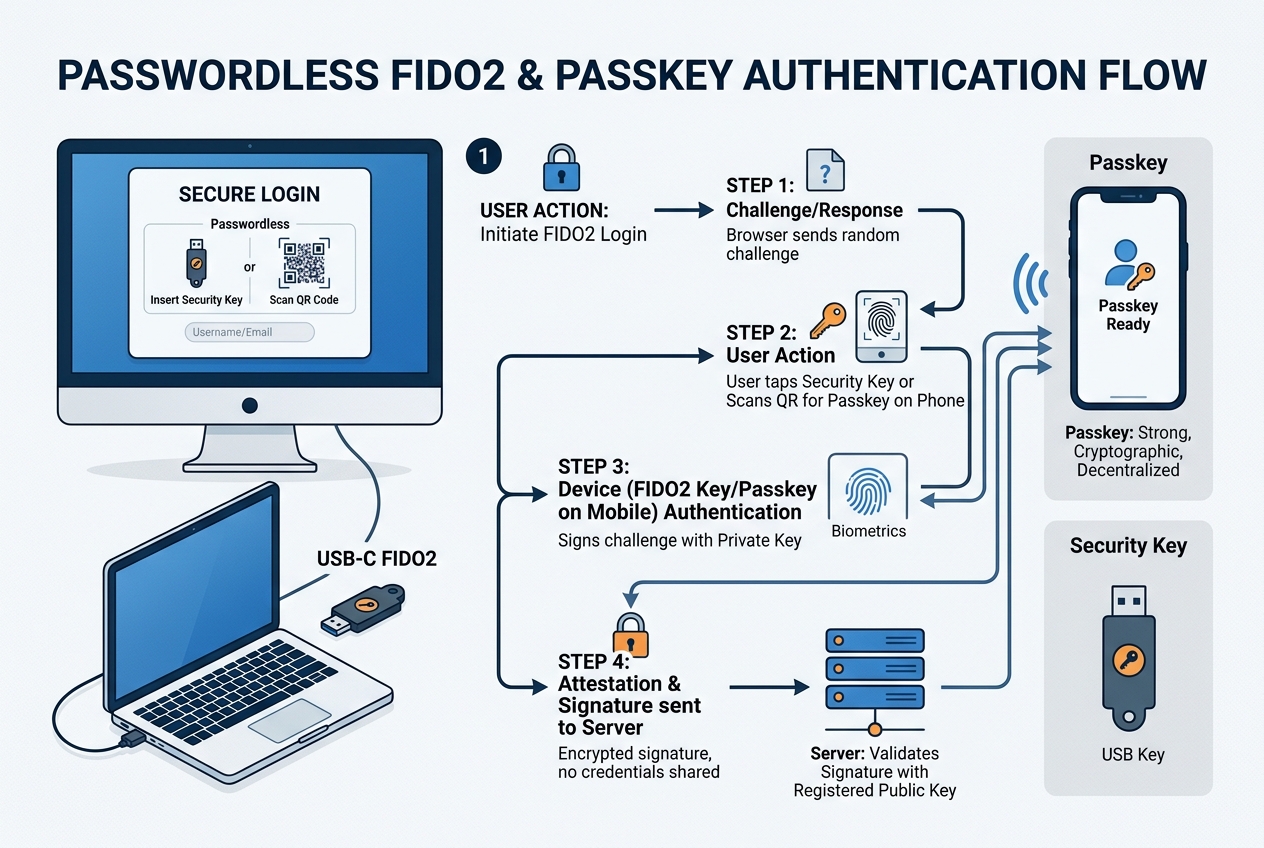
This overhaul represents more than convenience. In modern cybersecurity frameworks, static workstation passwords represent a persistent threat vector subject to shoulder surfing, credential stuffing, and memory scrapers. By moving the passkey threshold to the display manager, GNOME 51 aligns Linux desktop operations with zero-trust principles established across modern web services. When an employee logs in via a physical token, their session key is bound directly to hardware registers, eliminating the possibility of keylogger interception or plain-text credential retention in swap memory.
⚡ Dynamic Frame Scheduling in Mutter Replaces Guesswork
The compositor is the beating heart of any Wayland desktop session. In GNOME, Mutter coordinates rendering, window management, input dispatching, and hardware presentation timing. For several release cycles, developers working on compute-heavy tasks encountered an intermittent yet frustrating phenomenon: whenever a background thread initiated a massive code compilation, Docker container build, or video transcoding job, the desktop frame rate would hitch, causing mouse cursor jitter and dropped animation frames.
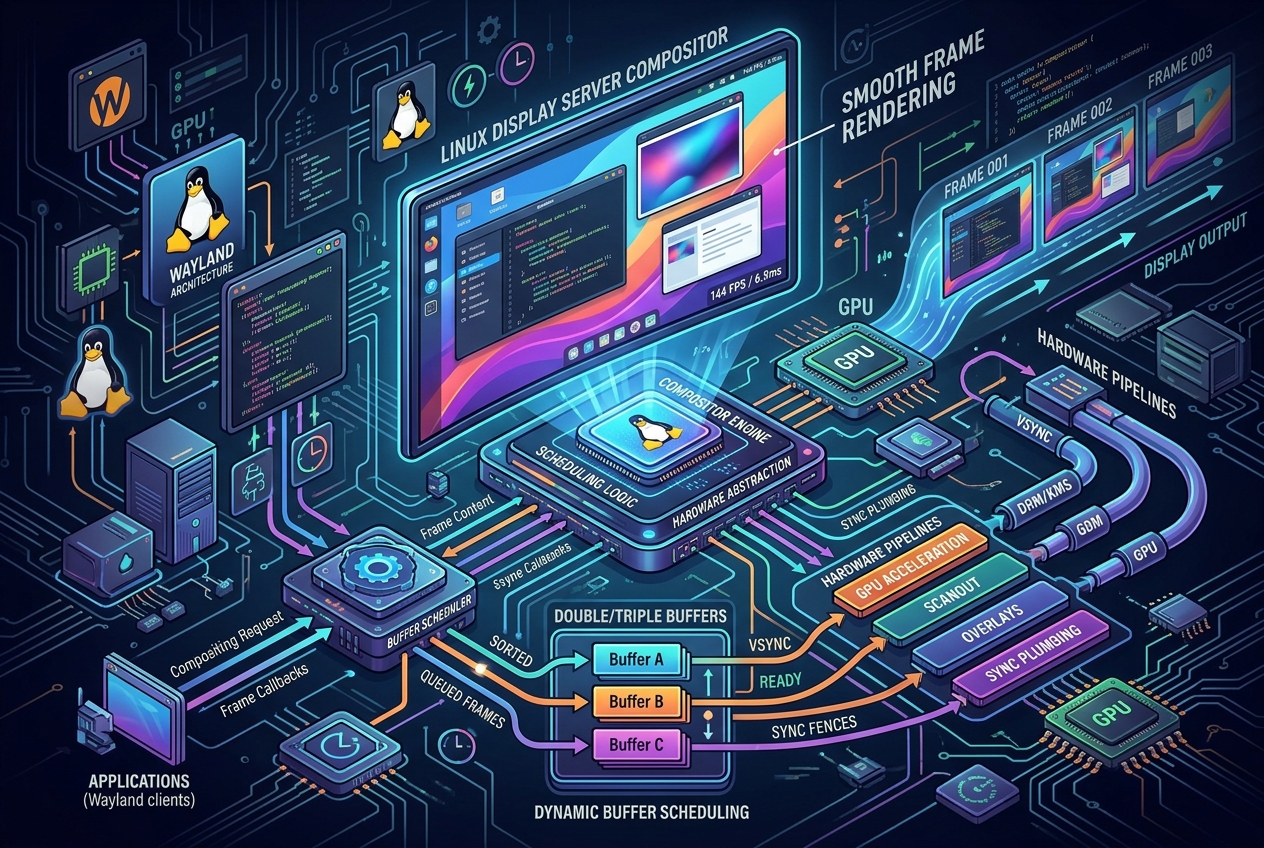
GNOME 51 resolves this limitation by discarding Mutter's legacy static render-time estimator in favor of a dynamic frame scheduler. Under the prior implementation, Mutter calculated when to begin rendering the next display frame based on fixed historic averages. When a sudden CPU spike occurred, the time required to composite the scene expanded unpredictably, causing Mutter to miss the display panel's vertical blanking interval (vblank). The result was a visible stutter.
The new scheduler actively tracks system load, GPU execution latency, and presentation deadlines in real time. Instead of relying on static constants, it continuously recalculates the optimal render start window on a microsecond scale. When background threads saturate CPU cores, Mutter dynamically pulls its composite deadlines forward, reserving sufficient execution time on the GPU to guarantee that frames arrive before the hardware vblank deadline.
A crucial technological companion in GNOME 51 is the stabilization of explicit synchronization protocols via linux-drm-syncobj-v1. Historically, Linux graphics relied on implicit synchronization, where the kernel driver made assumptions about buffer read and write readiness. Under heavy workloads, implicit sync led to buffer contention, frame drops, and tearing. With explicit sync standardized across Mutter, GTK 4.24, and modern Mesa drivers, the compositor and applications exchange explicit timeline points. Mutter knows precisely when an application has finished drawing to its surface, allowing the compositor to schedule the display composition without unnecessary polling or defensive delays.
The practical impact on developer productivity is immediate. In benchmark tests conducted by distribution maintainers, running an eight-thread Rust or C++ compilation while dragging complex browser windows produced zero dropped frames on mid-tier multi-core hardware. By isolating interactive input and compositor execution from background compute starvation, GNOME 51 transforms the desktop into an environment where intensive local development jobs no longer degrade interface fluidity.
🖥️ Software-Managed Brightness Tames HDR Display Profiles
High Dynamic Range (HDR) adoption on Linux has historically been complicated by the sheer diversity of display hardware and driver capabilities. While recent kernel and Wayland protocol updates established HDR signaling pathways, user-facing controls often behaved unpredictably. Operators switching between standard dynamic range (SDR) content and HDR video frequently noticed erratic display backlight behavior, where adjusting the desktop brightness slider produced jarring visual shifts or failed to alter panel luminance altogether.
GNOME 51 tackles this problem by shifting brightness management into software within Mutter. On modern HDR monitors, hardware backlights are engineered to remain at elevated luminance levels to preserve headroom for localized specular highlights. When a desktop environment attempts to manipulate the global hardware backlight directly, it disrupts the monitor's tone-mapping curve.
Under the new software-managed model in GNOME 51, Mutter maintains an accurate internal color pipeline. The desktop brightness slider now adjusts the luminance scale factor applied to SDR surfaces within the wide-gamut HDR color space, rather than forcing hardware backlight commands over DDC/CI or driver interfaces. This allows SDR desktop elements (such as code editors, terminals, and web browser windows) to be dimmed comfortably for evening work while preserving full hardware dynamic range for HDR content rendered alongside them.
The color pipeline in GNOME 51 also integrates the evolving frog-color-management Wayland protocol extensions. This allows color-managed creative applications, such as image editors and video grading tools, to pass calibrated ICC profiles and chromaticity coordinates directly to the compositor. Mutter maps these surfaces using hardware-accelerated shaders into the display monitor's target color space, preventing color clipping and gamma distortion.
Additionally, Mutter introduces persistent software luminance profiles that survive system sleep, display disconnection, and monitor hotplugging. In earlier releases, waking a laptop connected to an external HDR monitor frequently reset the display to maximum brightness. GNOME 51 stores EDID-matched software luminance values across session restarts, ensuring consistent visual comfort for designers and developers who rely on color-calibrated displays.
✍️ Native Visual Signatures in Papers Eliminate Third-Party Tools
Document workflows in small agencies and development teams regularly involve signing contracts, non-disclosure agreements, and invoices. On Linux, this routine task historically forced users into an awkward choice: either upload sensitive business documents to commercial proprietary cloud signing platforms, or install cumbersome legacy PDF suites requiring complex Java or Wine runtimes.
With GNOME 51, Papers (the modern GTK4 and Libadwaita document reader that succeeded Evince) introduces native visual document signing. The feature is integrated directly into the primary application toolbar, avoiding external dependencies or cloud round-trips.
The implementation provides two distinct signing workflows:
- Direct Touchpad or Stylus Input: Users can draw their signature directly on a dedicated vector canvas using a stylus, drawing tablet, or precision touchpad. Papers renders the stroke as clean vector paths with customizable line thickness, smoothing filters, and pressure-sensitive width variation.
- Imported Signature with Automatic Background Removal: For users who maintain an image of their written signature, Papers allows importing image files (PNG, JPEG, or SVG). An integrated image processing filter analyzes the imported graphic, detects the paper background, and automatically strips out off-white or shaded backing, leaving a crisp, transparent signature asset that blends naturally into document pages.
Security and privacy considerations are central to this design. The signature assets are stored locally in the user's encrypted keyring using libsecret, preventing unprivileged local processes or background scripts from accessing the vectorized signature file. When applied to a PDF, the signature is flattened directly into the document's visual annotation stream without transmitting metadata to remote verification servers.
Once authored or imported, signatures can be stored locally in an encrypted user credential vault for one-click placement across future documents. Papers embeds the resulting visual asset directly into the standard PDF annotation layer, ensuring full compatibility with Adobe Acrobat, web browsers, and enterprise document archival systems. For small studios processing client agreements, this feature closes a long-standing workflow gap locally and securely.
🗺️ Offline Routing and Transit Schedules Modernize GNOME Maps
Navigation and mapping tools on open-source desktops have often lagged behind mobile operating systems, largely due to reliance on remote map tile servers and internet connectivity. GNOME Maps in version 51 bridges this gap by introducing full offline map management alongside real-time public transit integrations.
Through integration with OpenStreetMap data sources and local vector rendering via libshumate, GNOME Maps now allows users to pre-download regional map bundles for offline use. Travelers and field engineers working in areas with limited or intermittent connectivity can search street names, view geographic boundaries, and plan navigation routes without transmitting location queries to external servers.
Key functional additions in GNOME Maps 51 include:
- Offline Vector Routing: The embedded routing engine calculates driving, cycling, and walking directions entirely on local hardware using stored road networks, eliminating latency and data transmission costs.
- Walking Time and Terrain Estimates: Pedestrian routing incorporates topographic elevation data to provide realistic walking duration estimates, highlighting steep inclines that impact foot travel.
- Real-Time Public Transit Timetables: When connected to transit networks supporting open General Transit Feed Specification (GTFS) protocols, Maps displays live vehicle departure schedules, platform numbers, and service delay notices directly inside the route overview.
- Local Spatial Bookmarking: Waypoints, meeting venues, and client offices can be organized into private geographic collections synchronized securely across devices via Nextcloud or local WebDAV endpoints.
By delivering offline reliability and transit data within a clean Libadwaita interface, GNOME Maps transitions from a casual viewer into a dependable utility for mobile professionals. For remote consultants traveling between client offices, having zero-latency vector maps operating independently of cellular coverage provides genuine utility.
⚠️ The Architectural Cost: Legacy NVIDIA Drivers and EGLStreams Deprecated
Every major architectural leap forward requires retiring outdated technical debt. In GNOME 51, that retirement arrives in the graphics stack: Mutter has officially and permanently excised the legacy EGLStreams code paths.
For context, when Wayland adoption began a decade ago, NVIDIA initially refused to support the open-source Generic Buffer Management (GBM) standard adopted by Mesa and the wider Linux graphics ecosystem. Instead, NVIDIA promoted EGLStreams, forcing compositor maintainers like the GNOME and KDE teams to build and maintain separate, highly complex rendering pipelines solely for proprietary NVIDIA drivers. NVIDIA eventually reversed course, implementing standard GBM support in its 495 and 500-series driver branches years ago.
With GNOME 51, the upstream maintainers concluded that carrying thousands of lines of fragile, specialized EGLStreams fallback code was no longer defensible. The consequences are definitive:
- Modern NVIDIA Hardware Supported: Any NVIDIA graphics card running modern proprietary drivers (version 515 and newer) or the open-source Nova and NVK drivers utilizes standard GBM and operates smoothly under GNOME 51 Wayland sessions. These GPUs benefit fully from explicit synchronization and zero-copy direct scanout.
- Legacy NVIDIA Hardware Deprecated on Wayland: Older GPUs that depend on legacy driver branches (specifically the 390.xx and 470.xx driver series, covering GeForce 600 and 700 Kepler-generation cards, with the exception of early Maxwell variants like the GTX 750) cannot run GNOME 51 under Wayland. Users on these legacy architectures are restricted to running GNOME 51 under the legacy X11 session or remaining on long-term support distributions.
Beyond graphics drivers, GNOME 51 introduces several ecosystem constraints that workstation administrators must evaluate. While the core desktop environment has completed its migration to GTK4 and Libadwaita, specific secondary utilities (most notably GNOME Disks) deferred their GTK4 port to future release cycles. The disk utility remains fully functional under GTK3, but users running mixed scaling environments may notice minor visual discrepancies between modern Libadwaita windows and legacy GTK3 dialogs.
Furthermore, a planned granular slider for touchpad scroll acceleration was postponed to allow for deeper protocol alignment in libinput. Maintainers opted to prioritize stability over rushed configuration toggles, ensuring that input curves remain predictable across divergent laptop hardware vendors.
Finally, as with every major shell release, third-party GNOME Shell extensions require manifest updates and API verification. While extensions utilizing documented libadwaita and St APIs migrate easily, complex extensions that patch internal Mutter prototypes will require developer updates before running stably on version 51. Workstation leads should conduct an extension audit prior to general workstation rollout.
🐧 Distribution Timelines Across Fedora, Ubuntu, and Rolling Releases
The availability of GNOME 51 across Linux distributions depends on the release cadence of individual operating system maintainers. Because GNOME serves as the upstream foundation for multiple distributions, rollout dates vary significantly between bleeding-edge releases and enterprise platforms.
The distribution roadmap for GNOME 51 aligns as follows:
- Fedora 45: The upstream flagship implementation of GNOME 51 will arrive in Fedora 45, whose final release is targeted for October 20, 2026 (with a secondary fallback target of October 27, 2026). Fedora delivers a pure, unadulterated upstream GNOME experience without custom styling or functional alterations, making it the primary reference platform for testing. Developers seeking the exact reference implementation designed by the GNOME Foundation will find it here.
- Ubuntu 26.10 (Questing Quokka): Scheduled for public launch on October 15, 2026, Ubuntu 26.10 incorporates GNOME 51 as its primary desktop environment. Canonical applies its familiar product layer, including the default left-hand Ubuntu Dock, customized Yaru theme accents, and built-in AppIndicator support for system tray icons. Ubuntu also bundles its own proprietary driver installer enhancements to assist users transitioning to GBM-compatible NVIDIA packages.
- Arch Linux and openSUSE Tumbleweed: Rolling-release distributions begin staging GNOME 51 packages in testing repositories shortly after upstream tagging. Users can expect general availability in stable repositories within two to three weeks following automated integration and regression testing. These platforms provide early visibility into how GNOME 51 interacts with cutting-edge Linux 6.16+ kernels and the latest Mesa graphic libraries.
- Ubuntu 26.04 LTS Stability: Workstations operating on Ubuntu 26.04 LTS (Resolute Raccoon) will not receive GNOME 51. In accordance with Canonical's long-term support policies, 26.04 LTS remains anchored to GNOME 50 for its entire standard five-year lifecycle. Teams requiring GNOME 51 capabilities must plan an explicit migration to interim releases or containerized developer environments.
- GNOME OS Nightly: For developers and quality assurance teams, GNOME OS provides immediate access via bootable UEFI images designed for virtual machines and bare-metal testing. Built directly from git main, GNOME OS serves as the cleanest sandbox for isolating desktop environment issues from distribution-specific packaging scripts.
Understanding these timelines enables development leads to schedule testing phases well before production machines encounter distribution update prompts.
🛠️ Testing, Installation, and Safe Upgrades for Production Machines
Upgrading an operational workstation should never be an impulsive action. A structured deployment methodology separates teams that experience smooth transitions from those that lose billable hours to broken desktop sessions.
Isolated Virtualized Rehearsal
Before touching physical hardware, evaluate GNOME 51 in an isolated environment:
- Download the current GNOME OS installation image from GNOME's developer portal.
- Launch GNOME Boxes or a QEMU/KVM hypervisor, select New Virtual Machine, and point to the downloaded image.
- Verify your team's routine development stack: clone repositories, run local development servers, and confirm that your code editor displays fonts and window geometry accurately.
- Inspect how multi-window workflows behave when dragging tabs across virtual displays, observing whether Mutter dynamic scheduling maintains interface responsiveness under synthetic CPU stress.
Developers creating Flatpak applications can test against the new runtime without altering their host operating system:
flatpak install flathub org.gnome.Sdk//51
flatpak install flathub org.gnome.Platform//51
Upgrading Testbeds on Tier-1 Distributions
For organizations running non-critical secondary test laptops on Fedora or Ubuntu, pre-release testing channels provide a direct installation route:
On Fedora (transitioning from Fedora 44 to Fedora 45 Beta/Branch):
sudo dnf upgrade
sudo dnf distro-sync
sudo systemctl reboot
On Ubuntu (transitioning to Ubuntu 26.10 interim releases):
sudo apt update && sudo apt dist-upgrade
sudo do-release-upgrade -d
Post-Installation Configuration Checklist
Once GNOME 51 is booted on physical hardware, execute a targeted post-install verification:
- Register Security Keys: Navigate to Settings > Users, select your user profile, and enter the Authentication options menu to register hardware FIDO2 keys or mobile passkeys. Test unlocking the session from both cold boot and screen lock states.
- Configure Touchpad Guard: In Settings > Mouse & Touchpad, enable the new toggle that automatically suspends the laptop touchpad whenever an external mouse is connected, preventing palm interference during typing.
- Review Shell Extensions: Install the standalone Extension Manager utility (
gnome-shell-extension-manager). Audit all active extensions and disable any legacy packages that have not yet declared compatibility with Shell version 51. - Inspect Display Scaling and EDID Settings: Open Settings > Displays, verify fractional scaling settings, and check that software brightness controls adjust SDR windows smoothly without altering external display backlight stability.
Following this disciplined sequence ensures that hardware edge cases or incompatible utility scripts are surfaced during staging rather than in the middle of a client release cycle.
🧭 What GNOME 51 Means for Workstations and Web Teams
The release of GNOME 51 illustrates a mature desktop environment refining its technical foundations. Rather than chasing ephemeral design fads, the GNOME community has invested engineering resources where it matters most for daily productivity: session security, rendering consistency, and graphics pipeline hygiene.
For web agencies, digital studios, and software engineering teams, the takeaways are pragmatic:
- Security Without Friction: Native FIDO2 and passkey support at the display manager level allows technical leads to enforce hardware-backed authentication across company laptops without burdening staff with complex command-line PAM scripts. Workstations gain hardware-enforced session protection suitable for zero-trust operational standards.
- Uncompromised Multitasking: The dynamic Mutter frame scheduler ensures that heavy local workloads (such as running test suites, asset compilation, or container image builds) no longer compromise the responsiveness of the desktop interface. Developers can build and test continuously without enduring cursor stutter.
- Clean Hardware Boundaries: The definitive retirement of legacy EGLStreams clarifies hardware procurement. Modern development hardware with standard GBM support will enjoy rock-solid Wayland stability, while legacy machines must be transitioned or retired from frontline development duty.
- Self-Contained Workflows: Built-in PDF signing in Papers and offline routing in Maps reduce reliance on third-party SaaS tools for daily administrative chores, keeping client contracts and location queries strictly local to the workstation.
A successful operating system migration is one that goes unnoticed by clients and team members because it was rehearsed with discipline. Use the pre-release window in Fedora 45 and Ubuntu 26.10 to evaluate your workflow, verify your hardware, and adopt GNOME 51 on your own timeline with verified evidence.
Sources: GNOME 51 Release Documentation; GitLab Mutter Release Notes; GitLab GDM Repository; Fedora 45 Schedule; Ubuntu 26.10 Schedule.


