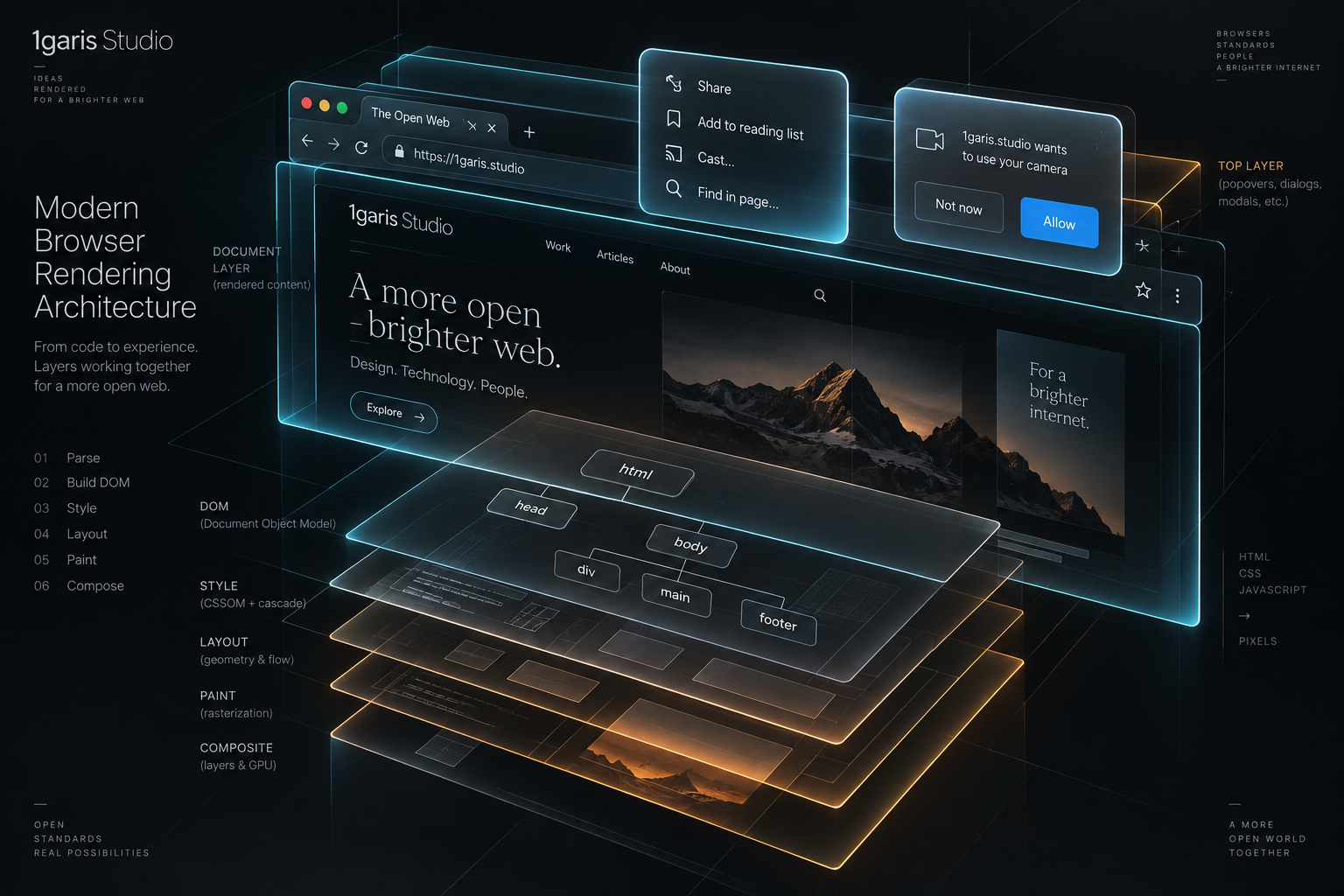
For nearly fifteen years, every front-end engineering sprint that involved building a modal, a flyout menu, a tooltip, or an action drawer began with the exact same reflex: open the terminal, query the package registry, and install an external UI library. Developers pulled in packages like Popper.js, Floating UI, React Modal, Radix Primitives, Headless UI, or Bootstrap. These packages were not adopted out of laziness; they were defensive necessities. Building an overlay that behaved correctly across diverse operating systems and input devices was one of the most notoriously fragile undertakings in web development.
A truly production-grade overlay demands complex browser orchestration. The overlay must sit visually on top of every other element on the screen, completely immune to the CSS overflow and z-index rules of parent containers. It must trap keyboard focus so that visitors using screen readers or tab navigation cannot accidentally trigger links buried in the background page. It must support light dismiss, closing gracefully when a user clicks outside its perimeter or taps the Escape key. It must make the underlying document inert, preventing background scrolling and interaction while a critical confirmation remains active. Furthermore, it must return keyboard focus to the exact button that opened it once dismissed. Solving these interconnected challenges in custom JavaScript required hundreds of lines of brittle DOM event listeners, document-level mutation observers, and thousands of lines of polyfill code. Over time, modal and floating UI dependencies quietly ballooned front-end bundle sizes by thirty to eighty kilobytes per application.
That entire paradigm has now shifted. Over the last twenty-four months, browser rendering engines have reached unanimous consensus around a suite of native web platform primitives: the HTML dialog element, the Popover API, the browser Top Layer, CSS starting-style, and declarative invoker commands. These specifications, spearheaded by the W3C Open UI Community Group and shipped across Chromium, WebKit, and Gecko under the Web Platform Baseline initiative, transfer the heavy lifting of layered user interfaces directly into the browser's native C++ rendering engine. Today, small engineering teams and independent digital publishers can build accessible, animated, light-dismissable overlays using pure HTML attributes and minimal CSS, eliminating entire categories of third-party runtime dependencies.
📦 The hidden weight of modern user interface libraries
To understand why native platform primitives represent such a profound architectural upgrade, one must first audit the true cost of legacy JavaScript overlay libraries. When an engineering team imports a modal or tooltip component from an npm package, they rarely import a single isolated function. They import an entire ecosystem of defensive workarounds designed to compensate for the historical limitations of the Document Object Model.
Consider the dependency tree of a standard floating menu component in a modern web framework. To position the menu adjacent to an anchor button, the component pulls in a positioning engine that measures client bounding rectangles, scroll offsets, and viewport dimensions on every frame. To prevent the menu from being clipped by a parent container styled with overflow hidden, the component utilizes a DOM portal, detaching the menu elements from their natural semantic hierarchy and injecting them into a generic container appended directly to the document body.
This DOM portal architecture immediately creates secondary complications. Because the menu has been physically relocated to the root of the document tree, the browser's natural tab sequence breaks. Keyboard focus can no longer move logically from the trigger button into the menu items. To compensate, the library bundles a focus management package that intercepts Tab and Shift-Tab keystrokes, calculates all focusable elements inside the portal, and manually forces element focus via synthetic event handlers.
Next comes the challenge of inertness. While a modal dialog is active on screen, the rest of the web application should be inaccessible to keyboard, mouse, and assistive technology users. Prior to the standardized inert attribute, libraries accomplished this by traversing the entire DOM tree, finding every sibling node of the portal container, and dynamically appending aria-hidden attributes and negative tab indices. When the modal was dismissed, another script had to reverse the process, carefully restoring whatever arbitrary accessibility states existed before the modal opened.
Finally, consider the memory and execution footprint of click-outside detection. To determine whether a user has clicked outside a dropdown or popover, legacy components attach capture-phase click and pointerdown listeners to the global window object. On complex, dynamic web applications with dozens of active dropdowns, select menus, and tooltips, the browser's main thread is bombarded with event dispatches for every single user tap, scroll, and pointer movement. On mobile devices with constrained processors and limited battery capacity, this background event processing contributes directly to input delay and sluggish touch responsiveness.
According to HTTP Archive audits, the average production website ships hundreds of kilobytes of JavaScript solely dedicated to managing visual components that modern browser engines can now execute natively with zero custom script. This unnecessary runtime overhead degrades Core Web Vitals, inflates mobile memory consumption, and introduces subtle accessibility regressions that violate international digital inclusion standards.
🔝 The magic and mechanics of the browser top layer
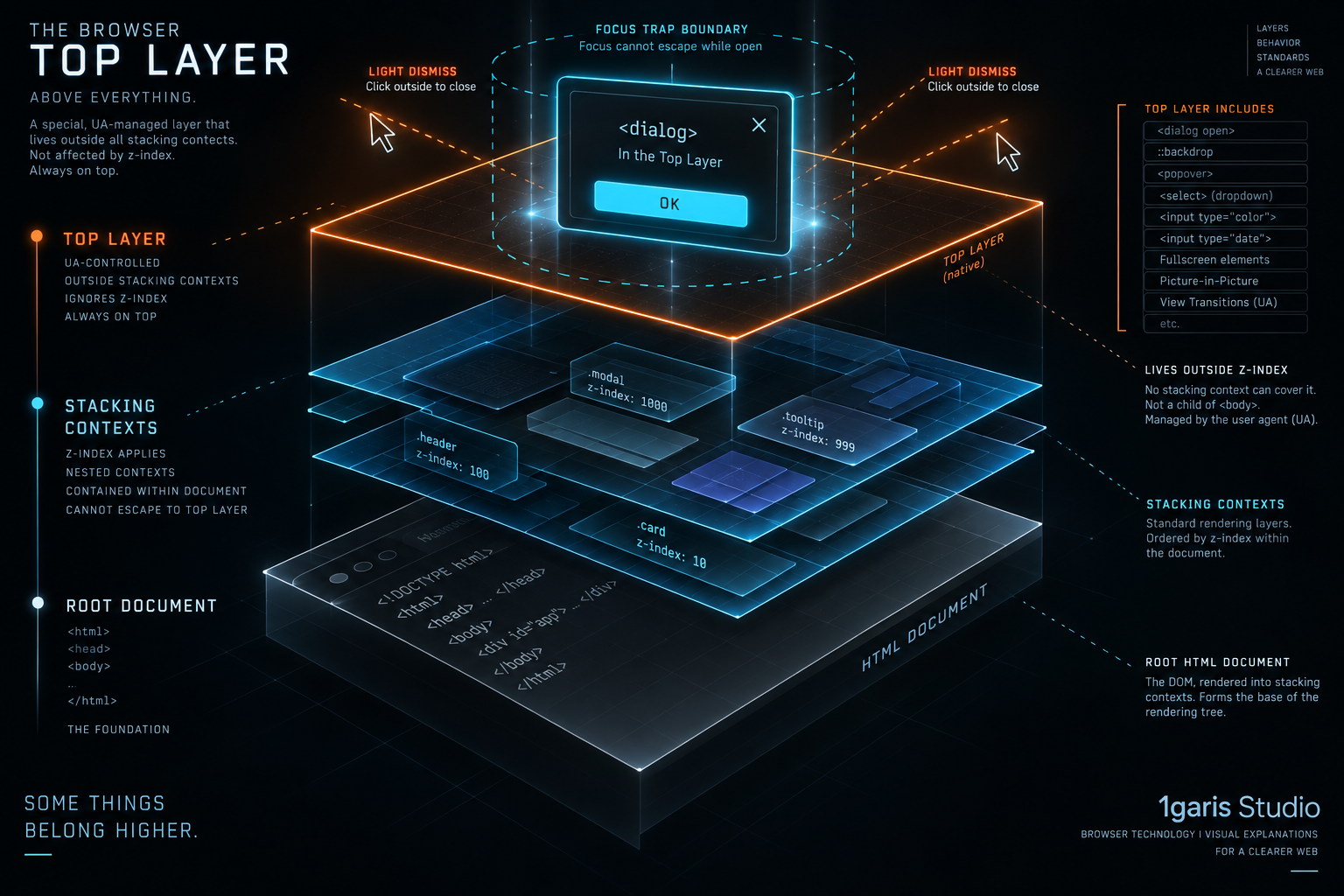
The architectural breakthrough that renders these legacy libraries obsolete is a browser feature known as the Top Layer. In traditional CSS rendering, an element's stacking order is governed by stacking contexts, created by properties such as position relative with a z-index, opacity less than one, transform, filter, or will-change. Within this classical model, developers frequently encounter the dreaded z-index arms race. An engineer gives a navigation bar a z-index of 100, another gives a notification badge 999, and a third gives a customer service widget 999999.
Yet even a z-index of 999999 fails when an element is trapped inside an ancestor container that establishes its own stacking context with overflow hidden or position fixed. No matter how large a child element's z-index might be, it cannot visually escape the boundary box of its parent stacking context. This fundamental constraint was the sole reason front-end frameworks were forced to invent virtual DOM portals and body-level element injection.
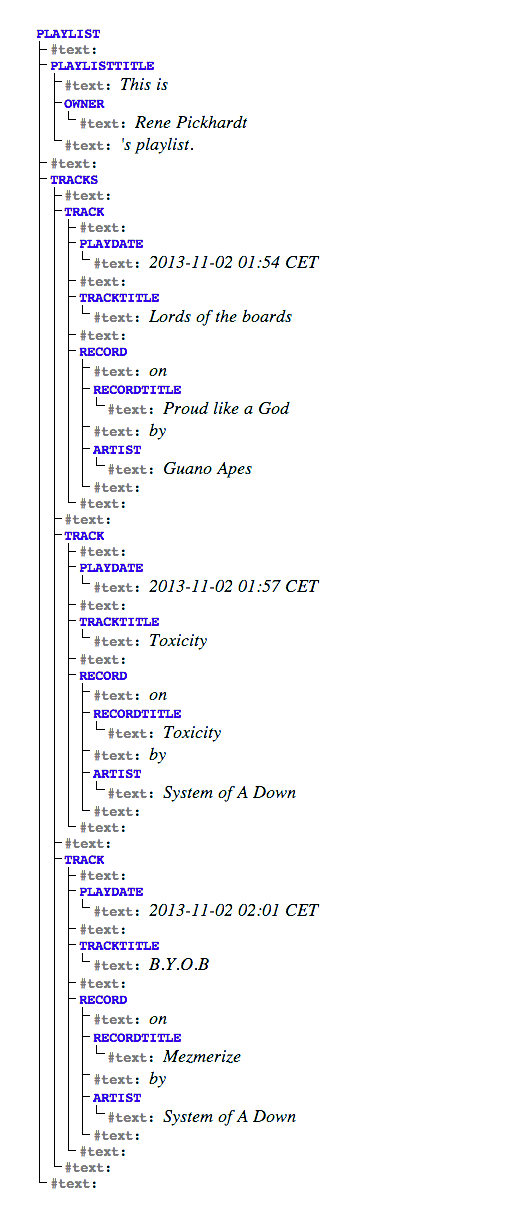
The Top Layer completely dismantles this constraint. Specified by the WHATWG HTML standard and implemented uniformly across all modern browsers, the Top Layer is an internal rendering plane that sits entirely outside the document flow, floating physically above every regular DOM node and every CSS stacking context.
When an element is promoted to the Top Layer, several remarkable things happen simultaneously:
First, the element renders above all other elements on the page, regardless of where it is nested inside the HTML source code. A popover or dialog can reside inside deeply nested article markup, within an overflow-clipped sidebar, or inside a complex grid layout. The moment it opens, the browser rendering engine lifts it out of the normal stacking tree and paints it directly on the Top Layer. There is no need for DOM portals, no need to relocate nodes in memory, and no risk of parent overflow clipping.
Second, the Top Layer maintains its own internal stacking order based strictly on chronological invocation. If element A is opened in the Top Layer, and subsequently element B is opened from inside element A, element B naturally stacks on top of element A. You do not need to configure z-index values for elements in the Top Layer; in fact, the CSS z-index property has no effect whatsoever on elements residing in the Top Layer.
Third, the browser automatically attaches a dedicated pseudo-element named ::backdrop directly beneath any element promoted to the Top Layer. This backdrop spans the entire viewport and can be styled with CSS properties like background-color, opacity, and backdrop-filter to obscure or blur background content. In legacy web design, creating a modal backdrop required adding a separate dummy div to the markup and synchronizing its display state with the modal via JavaScript. With native Top Layer components, the backdrop is a browser-managed rendering primitive that exists only when the element is active.
dialog::backdrop {
  background-color: rgba(15, 23, 42, 0.65);
  backdrop-filter: blur(4px);
}
By delegating layered positioning to the Top Layer, developers completely eliminate the structural cause of visual clipping bugs without altering their component architecture.
🪄 Popover versus dialog: Choosing the right architectural primitive
While both the HTML dialog element and elements using the popover attribute utilize the browser Top Layer, they solve fundamentally different user interface problems. Confusing their roles is the most common mistake engineering teams make when migrating away from legacy libraries. Choosing between them requires understanding the distinction between modal and non-modal interactions.
The HTML dialog element is designed primarily for modal workflows. A modal interaction is an urgent, high-stakes interruption where the application demands a user decision before allowing any further engagement with the underlying page. Common examples include confirming the permanent deletion of a database record, entering multi-factor authentication credentials, or presenting a critical legal agreement.
When a dialog element is displayed using its native showModal method, the browser places it in the Top Layer, renders the full-viewport backdrop beneath it, and marks every other element in the entire document tree as inert. While a modal dialog is open, the visitor cannot click buttons on the page, cannot select background text, and cannot navigate to background links using the Tab key. The browser automatically traps keyboard focus inside the dialog, cycling through its interactive controls and preventing focus from leaking out.
// Declarative dialog markup structure
dialog({ id: "delete-confirmation-dialog" }, [
  h2("Confirm Deletion"),
  p("Are you sure you want to permanently delete this project?"),
  form({ method: "dialog" }, [
    button({ value: "cancel" }, "Cancel"),
    button({ value: "confirm" }, "Delete Project")
  ])
])
In contrast, the Popover API is designed for non-modal, layered conveniences. A popover presents supplementary information or contextual actions without blocking access to the rest of the application. Typical examples include navigation dropdown menus, user profile flyouts, contextual action bars, inline tooltips, and non-blocking toast notifications.
// Declarative popover markup representation
button({ popovertarget: "user-menu" }, "My Account")

div({ id: "user-menu", popover: "" }, [
  nav([
    a({ href: "/profile" }, "Profile Settings"),
    a({ href: "/billing" }, "Subscription"),
    a({ href: "/logout" }, "Sign Out")
  ])
])
The popover attribute is a global HTML attribute that can be applied to any HTML element, turning that element into a native popover. Crucially, popovers do not make the rest of the page inert. A user can open a profile dropdown, look at the available options, and simultaneously click a link in the main navigation or copy text from an open paragraph.
Furthermore, the Popover API supports two distinct operational modes via the attribute value:
The default mode, popover="auto", provides automatic light-dismiss behavior. When an auto popover opens, it automatically closes any other unrelated auto popovers currently visible on screen. If the user clicks outside the popover or presses the Escape key, the popover immediately dismisses itself. This makes popover="auto" the ideal primitive for dropdown menus and action sheets.
The alternative mode, popover="manual", disables automatic light-dismiss and auto-closure. A manual popover stays open until explicitly closed via a button or script, allowing multiple manual popovers to coexist simultaneously. This mode is suited for persistent toast alerts, multi-step onboarding callouts, and floating media players.
Understanding this architectural boundary is straightforward: if the user must finish interacting with the surface before touching anything else on the page, use the dialog element with showModal. If the surface provides contextual, non-blocking utility that should disappear as soon as the user shifts their attention elsewhere, use an element equipped with the popover attribute.
⌨️ Focus management, accessibility, and the light-dismiss revolution
The most significant advantage of native browser primitives is not visual positioning, but accessibility and event handling. For over a decade, digital accessibility audits consistently flagged custom modals and dropdowns as the leading cause of WCAG non-compliance on commercial websites. Developers regularly forgot to manage keyboard focus, failed to trap focus within active dialogs, omitted proper ARIA roles, or left screen reader users stranded in empty DOM branches.
Native primitives resolve these accessibility challenges by enforcing correct behavior at the browser engine level.
When a dialog element is invoked with showModal, the browser automatically executes an intelligent focus algorithm:
First, it scans the children of the dialog for any element carrying the autofocus attribute. If found, it immediately places focus on that element. If no autofocus element exists, it automatically focuses the first focusable control inside the dialog, such as a text input or a confirmation button. If the dialog contains no interactive controls at all, it places focus on the dialog container itself, ensuring that screen readers immediately announce its presence and content.
Second, the browser establishes a native keyboard focus trap. When a user presses Tab while focused on the final interactive control inside the dialog, focus does not escape into the browser address bar or the background document; it wraps cleanly back to the first focusable element inside the dialog. When the user presses Shift-Tab on the first element, focus wraps to the last. This behavior occurs entirely within the browser's C++ input pipeline, requiring zero JavaScript event listeners and eliminating the risk of infinite focus loops caused by buggy client-side scripts.
Third, when the dialog is closed, whether by submitting a native dialog form, pressing the Escape key, or calling the close method, the browser automatically restores keyboard focus to the exact DOM element that was focused immediately before the dialog was opened. This single feature eliminates hundreds of lines of fragile focus-restoration logic previously required in React or Vue components.
// Legacy JavaScript focus management (approx. 40 lines of code)
let previousActiveElement = null;

function openLegacyModal(modal) {
  previousActiveElement = document.activeElement;
  modal.classList.add('is-open');
  const focusable = modal.querySelectorAll('button, [href], input, select, textarea');
  if (focusable.length) focusable[0].focus();
  document.addEventListener('keydown', handleFocusTrap);
}

function closeLegacyModal(modal) {
  modal.classList.remove('is-open');
  document.removeEventListener('keydown', handleFocusTrap);
  if (previousActiveElement) previousActiveElement.focus();
}

// Native HTML dialog equivalent (1 line of code)
document.getElementById('my-dialog').showModal();In parallel with dialog focus management, the Popover API introduces standardized light-dismiss into the browser engine. Historically, implementing a click-outside listener meant attaching a global click handler to the document and inspecting event targets to determine if the clicked node resided inside or outside the container. This approach frequently failed when nested elements were removed from the DOM before the click event reached the document listener, or when touch devices dispatched synthetic mouse events with varying timing delays.
With popover="auto", light dismiss is an intrinsic browser capability. The rendering engine maintains an internal stack of active popovers. When a pointer event or keydown event occurs outside the topmost popover boundary, the engine dispatches a beforetoggle event, fires any registered exit animations, and transitions the popover's computed display property to none. The implementation is rock-solid across mouse clicks, touchscreen taps, stylus inputs, and assistive technology gestures.
🎨 Smooth transitions with starting style and transition behavior
For years, the primary barrier preventing front-end developers from adopting native dialog and details elements was animation. In CSS, transitioning an element between display none and a visible display value (such as display block or display flex) was historically impossible. When an element's display property changed from none to block, the browser calculated its visual styles in a single layout pass; any defined CSS transitions were skipped because the element had no prior computed geometry from which to animate.
To achieve smooth fade-in and slide-in effects, developers were forced to use complex JavaScript timing functions, double-requestAnimationFrame hacks, or third-party animation libraries like Framer Motion or GSAP. A modal component had to be rendered into the DOM, forced to calculate layout in an invisible state, and then given an active CSS class on the next frame to trigger opacity and transform transitions.
With the standardization of CSS starting-style and the transition-behavior property, this historical limitation has been permanently solved. Shipped across all modern browser engines in CSS Transitions Level 2, these properties allow CSS transitions to animate discrete properties, including display and overlay, directly from the initial frame of rendering.
The @starting-style at-rule defines the initial visual values an element holds at the exact instant it transitions from display none into the visible rendering tree:
dialog {
  opacity: 0;
  transform: scale(0.92) translateY(12px);
  transition: opacity 0.25s cubic-bezier(0.16, 1, 0.3, 1),
              transform 0.25s cubic-bezier(0.16, 1, 0.3, 1),
              overlay 0.25s allow-discrete,
              display 0.25s allow-discrete;
}

dialog[open] {
  opacity: 1;
  transform: scale(1) translateY(0);
}

@starting-style {
  dialog[open] {
    opacity: 0;
    transform: scale(0.92) translateY(12px);
  }
}

dialog::backdrop {
  background-color: rgba(15, 23, 42, 0);
  transition: background-color 0.25s cubic-bezier(0.16, 1, 0.3, 1),
              overlay 0.25s allow-discrete,
              display 0.25s allow-discrete;
}

dialog[open]::backdrop {
  background-color: rgba(15, 23, 42, 0.65);
}

@starting-style {
  dialog[open]::backdrop {
    background-color: rgba(15, 23, 42, 0);
  }
}
Notice the inclusion of transition-behavior: allow-discrete (expressed in the shorthand as allow-discrete alongside display and overlay). This declaration instructs the browser engine to keep the element in the rendering tree and inside the Top Layer until the visual opacity and transform transitions have fully completed, even though the open attribute has been removed.
The exact same architectural pattern applies to elements styled with the popover attribute, using the :popover-open pseudo-class:
[popover] {
  opacity: 0;
  transform: translateY(-8px);
  transition: opacity 0.2s ease-out,
              transform 0.2s ease-out,
              overlay 0.2s allow-discrete,
              display 0.2s allow-discrete;
}

[popover]:popover-open {
  opacity: 1;
  transform: translateY(0);
}

@starting-style {
  [popover]:popover-open {
    opacity: 0;
    transform: translateY(-8px);
  }
}
With this pure CSS approach, modal dialogs, backdrops, and flyout menus glide into view and fade out smoothly without executing a single line of JavaScript animation code. The animations run on the browser's compositor thread, guaranteeing sixty frames per second even when the main JavaScript thread is busy parsing data.
🕹️ Declarative control through invoker commands
The final piece of the native layered UI ecosystem is the elimination of procedural click handlers. Historically, even if an engineer used the native dialog or popover element, they still had to write JavaScript event listeners simply to open and close them:
document.querySelector('#open-btn').addEventListener('click', () => {
  document.querySelector('#my-dialog').showModal();
});
The Popover API introduced declarative invocation through the popovertarget and popovertargetaction HTML attributes. By placing popovertarget on a standard button element, the browser connects the button directly to the target popover without any scripting:
// Declarative popover invocation
button({ popovertarget: "notification-panel" }, "View Alerts")

div({ id: "notification-panel", popover: "" }, [
  h3("Recent Notifications"),
  p("Your weekly analytics summary is ready for review."),
  button({ popovertarget: "notification-panel", popovertargetaction: "hide" }, "Dismiss")
])
Building upon this success, the W3C Web Incubator Community Group (WICG) and Open UI developed the Invoker Commands API, which standardizes declarative triggers across all interactive HTML elements, including modal dialogs, audio, video, and custom web components.
Using the commandfor and command attributes (which succeeded earlier experimental drafts such as invoketarget and invokeaction), buttons can declaratively control modal dialogs with zero custom JavaScript:
// Declarative invoker triggers
button({ commandfor: "feedback-modal", command: "show-modal" }, "Send Feedback")

dialog({ id: "feedback-modal" }, [
  form({ method: "dialog" }, [
    h3("Product Feedback"),
    textarea({ placeholder: "Tell us about your experience...", required: true }),
    div({ class: "actions" }, [
      button({ commandfor: "feedback-modal", command: "close" }, "Cancel"),
      button({ type: "submit", value: "submitted" }, "Submit Feedback")
    ])
  ])
])
When a user clicks or presses Enter on a button equipped with commandfor="feedback-modal" and command="show-modal", the browser automatically executes the dialog's showModal routine. It verifies element existence, checks authorization states, promotes the dialog to the Top Layer, and manages focus. When the cancel button with command="close" is activated, the browser closes the dialog and restores focus to the trigger button.
For software engineering teams, declarative invoker commands eliminate the boilerplate glue code that previously cluttered component render functions. Furthermore, because the relationship between the trigger and the target is explicitly declared in the HTML markup, browser engines and screen readers can automatically infer the structural relationship, exposing appropriate accessibility labels without requiring manual aria-haspopup or aria-controls attributes.
⚡ Real-world performance gains and bundle elimination
The cumulative business and technical impact of adopting native layered UI primitives is remarkable. For small digital product teams, independent development agencies, and resource-conscious software platforms, stripping out legacy UI libraries delivers measurable performance gains across three critical vectors: JavaScript payload reduction, main-thread responsiveness, and maintenance overhead.
To measure these improvements concretely, consider a real-world refactoring audit conducted on a mid-sized digital publishing platform. The original application utilized a popular component library that packaged floating-ui, focus-trap, and a custom portal renderer to power its navigation menus, search modal, author bio popovers, and share sheets.
Prior to the migration, the JavaScript bundles responsible for these UI interactions accounted for:
- Floating UI core and DOM positioning engine: 12.8 KB minified and gzipped
- Focus trap and tab-order polyfill: 6.4 KB minified and gzipped
- Portal mounting utilities and click-outside listeners: 4.2 KB minified and gzipped
- Modal transition wrappers and state coordinators: 11.5 KB minified and gzipped
- Total library overhead: 34.9 KB gzipped (over 105 KB of uncompressed JavaScript)
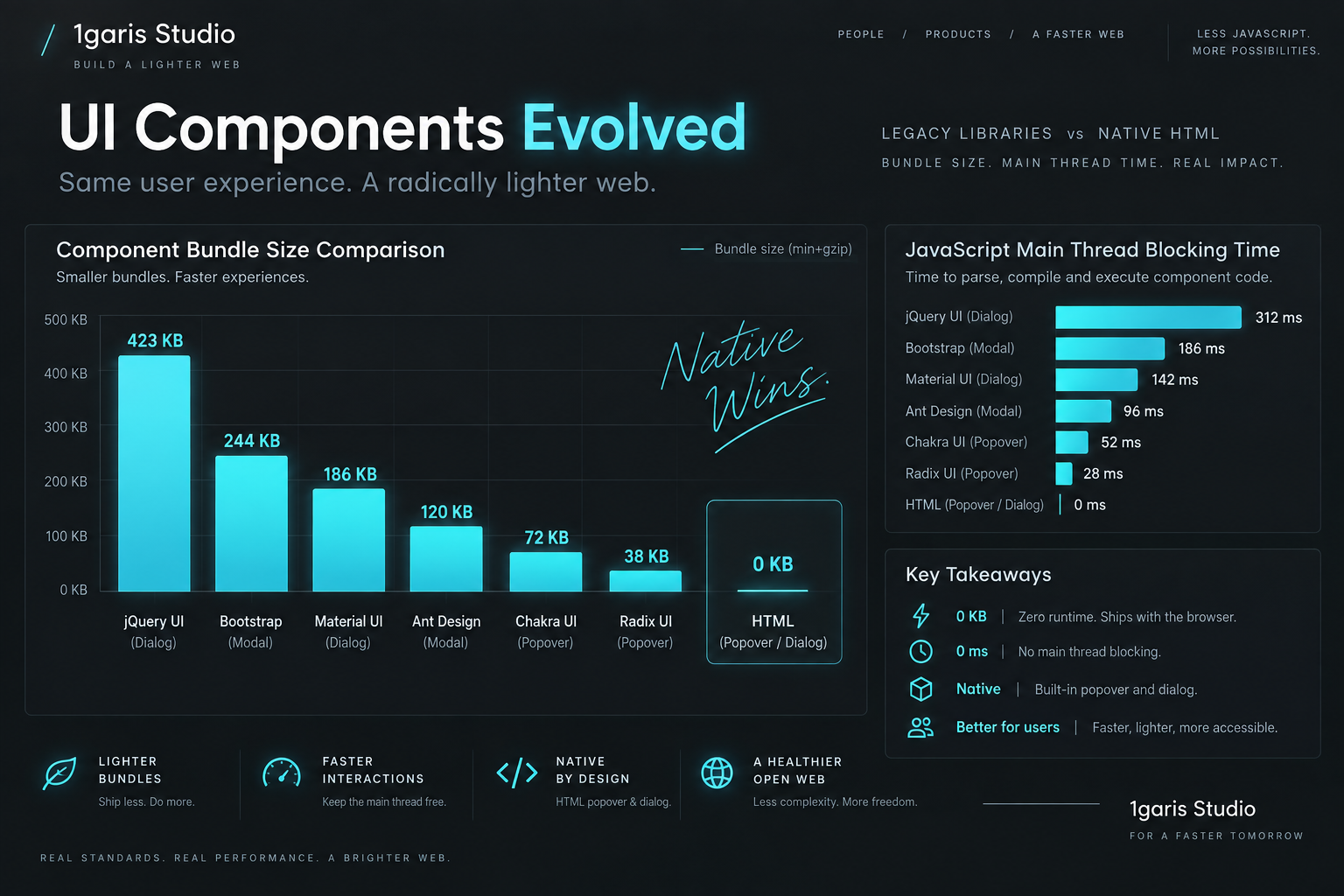
When the engineering team migrated these components to native HTML dialog elements and popovers with @starting-style transitions:
- Total library overhead dropped to 0.0 KB. The external npm packages were completely uninstalled.
- Component source code shrank by 62%, replacing dozens of lifecycle hooks and ref callbacks with straightforward HTML markup and CSS rules.
- Interaction to Next Paint (INP), Google's Core Web Vital measuring page responsiveness, improved by 38 milliseconds at the 75th percentile on mid-range Android devices, because the browser no longer processed global pointer listeners during tap interactions.
- Memory consumption during extended user sessions stabilized, as the native Top Layer automatically garbage-collects rendering structures upon element destruction without risking detached DOM node memory leaks.
Beyond raw performance metrics, native primitives virtually eliminate cross-browser compatibility bugs. When an operating system updates its virtual keyboard behavior or accessibility navigation layer, browser vendors update their internal C++ dialog implementations to handle the new edge cases automatically. When you rely on an npm package, you must wait for open-source maintainers to discover the bug, write a patch, publish a release, and hope that your dependency chain does not break during the upgrade.
🧭 A practical migration roadmap for small digital teams
Transitioning an existing production codebase from third-party UI libraries to native browser primitives does not require an all-or-nothing rewrite. Because native dialogs and popovers operate cleanly alongside existing front-end frameworks like React, Vue, Svelte, and plain vanilla JavaScript, teams can execute a calm, incremental migration.
Here is a practical, battle-tested four-step roadmap for engineering teams planning their transition:
The first step is auditing existing overlay components and sorting them into two functional buckets: modal workflows and non-modal popovers. Search your codebase for dependencies like react-modal, @radix-ui/react-dialog, @headlessui/react, or tippy.js. Identify which components strictly require full-page blocking (such as checkout confirmations or destructive action alerts) and which components merely require contextual flyouts (such as navigation menus, tooltips, or filter panels).
The second step is replacing non-modal flyouts with the Popover API. Because popovers require no procedural JavaScript to open and close, they are the easiest components to migrate. Start with header navigation menus and profile dropdowns. Add the popover="auto" attribute to the menu container, assign it a unique ID, and update the trigger button with popovertarget. Style the open state using :popover-open and apply @starting-style for smooth entry transitions. Verify that clicking outside the menu dismisses it immediately across both desktop browsers and mobile touchscreens.
The third step is replacing modal overlays with the native dialog element. For modal dialogs, update your component markup to render a semantic dialog element. Replace manual open state variables with calls to the dialog element's showModal method. If you are using server-side rendering or static site generation, note that dialog elements are hidden by default in standard CSS, preventing flash-of-unstyled-content issues during initial page load. Replace custom close buttons with native button elements carrying commandfor and command="close", or standard form elements with method="dialog".
The fourth step is cleaning up accessibility attributes and removing dead code. Once your native dialogs and popovers are active, remove manual aria-modal="true", aria-hidden toggles on background elements, and custom focus trapping scripts. The browser engine handles these obligations natively. Run an automated accessibility scanner such as axe-core or Lighthouse to verify that your landmarks, headings, and interactive targets remain fully compliant. Finally, run your package manager's prune command to permanently remove the legacy UI libraries from your production deployment.
By returning to the native capabilities of the web platform, web teams do more than reduce their JavaScript footprint; they build software that is inherently faster, more accessible, and resilient against future browser evolutions. The web platform has matured. It is time to let the browser do what it was built to do.
Sources: W3C Open UI Community Group, MDN Web Docs, Google Chrome web.dev, and the CSS Working Group.


