When you enable passkeys on an encrypted password manager or a private note-taking vault, the setup screen promises the end of passwords. You tap a fingerprint sensor on your laptop or touch the gold capacitive contact on a hardware security key, and the browser authenticates your session in less than a second. Then, just as you expect your encrypted vault to open, the screen halts and asks you to type your master password anyway.
For millions of users and software engineers, this double prompt has felt like a broken promise. If a passkey is built on unphishable public-key cryptography strong enough to satisfy banks, enterprise identity providers, and government agencies, why could it not unlock a vault of encrypted notes or saved credentials? For years, the answer lay in a fundamental mathematical boundary inside the Web Authentication (WebAuthn) standard: a standard passkey was engineered exclusively to verify identity, not to scramble or unscramble data.
That architectural divide is now closing. Through an extension in the World Wide Web Consortium (W3C) WebAuthn Level 3 specification known as the Pseudo-Random Function (prf), backed at the hardware protocol layer by the FIDO2 Client to Authenticator Protocol (CTAP2) hmac-secret extension, passkeys have acquired a second cryptographic capability. Without ever exposing their internal private keys, modern authenticators can now compute a deterministic, 256-bit secret during the exact same biometric or hardware tap that signs you in. Password managers including Bitwarden and 1Password, alongside European Digital Identity wallet prototypes such as the wwWallet project, are already using this mechanism to retire the master password while keeping zero-knowledge end-to-end encryption intact.
Understanding why passkeys initially failed at encryption, and how a seeded hash function inside a hardware secure element resolved the impasse, reveals the delicate line between proving who you are to a server and keeping your data illegible to that very same server.
🚪 Why Signing a Login Challenge Cannot Unlock an Encrypted Vault
To see why a standard passkey could only knock on the server's door without unlocking the encrypted safe inside, we have to separate two distinct cryptographic jobs: authentication and encryption.
Authentication is an interactive conversation with a gatekeeper. When you sign in to a regular website using a passkey, the website's server (referred to in WebAuthn specifications as the Relying Party) does not need to decrypt anything. The server already holds your account data in plain readable records inside its database; it simply refuses to show those records until you prove that you possess the device registered to your account.
WebAuthn accomplishes this through asymmetric public-key cryptography, most commonly using the Elliptic Curve Digital Signature Algorithm (ECDSA over the NIST P-256 curve) or Edwards-curve Digital Signature Algorithm (Ed25519). During account registration, your authenticator (whether a YubiKey, an Android phone, or a macOS Secure Enclave) generates a mathematical key pair:
- The Private Key: Locked permanently inside the authenticator's tamper-resistant secure hardware or isolated platform enclave. No browser API, operating system call, or remote server can read or export these bytes.
- The Public Key: Handed openly to the website's server to store alongside your username and credential identifier.
When you return to sign in, the server generates a one-time random string of bytes called a challenge (a cryptographic nonce) and sends it to your browser. Your browser combines that challenge with the verified website domain (origin), hashes the bundle, and passes it to the authenticator. The authenticator signs the hash using your private key and returns the resulting digital signature. The server then uses your stored public key to verify the signature mathematically.

In a zero-knowledge, end-to-end encrypted application, however, there is no gatekeeper holding readable data. A service like Bitwarden, 1Password, Proton Pass, or an encrypted medical journal stores only ciphertext blobs scrambled with an authenticated cipher such as AES-256-GCM. The server cannot hand you readable data after checking your ID, because the server itself has no idea how to decrypt the blob. To turn that ciphertext back into readable text inside your browser, your client application needs a symmetric encryption key: a specific, unchanging 256-bit sequence of ones and zeroes.
Here lies the myth that trips up even seasoned developers: Why not simply use the passkey's signature, or its public key, as the symmetric encryption key?
Every attempt to repurpose standard WebAuthn outputs for encryption collapses under basic cryptographic analysis:
- Why the Public Key Fails: By definition, the public key is transmitted to the remote server during registration so the server can verify future logins. In a zero-knowledge architecture, the remote server is treated as an untrusted storage locker. If your client app encrypted your vault using your WebAuthn public key, the server hosting your vault could immediately decrypt every single secret you own.
- Why the Private Key Fails: The WebAuthn API (
navigator.credentials.create()andnavigator.credentials.get()) provides zero methods to export or inspect the private key. Its entire security guarantee rests on the invariant that the private key never enters browser memory, where a cross-site scripting (XSS) vulnerability or malicious browser extension could steal it. - Why the Digital Signature Fails: Symmetric encryption demands strict determinism. If you lock a file with Key $K$ on Monday, you must feed the exact same Key $K$ into the decryption cipher on Friday, down to the last bit. If even one bit changes,
AES-GCMauthentication tag verification fails and your data remains permanently locked. Standard FIDO2 authentication signatures are intentionally non-deterministic. Every time you log in, the server issues a fresh random challenge, the authenticator increments an internal 32-bit signature counter (signCount), and theECDSAsigning algorithm injects a fresh cryptographic random nonce ($k$) into the elliptic curve equation. Sign in ten times in ten minutes, and your passkey will output ten completely different signatures. Even sending a static challenge fails becausesignCountand theECDSAnonce change on every assertion, and any observer of a static-challenge signature would immediately learn the key.
Because a standard passkey never produces a secret, repeatable output, client-side encryption apps were trapped. They could use a passkey to let you into your account lobby without typing an email address or two-factor code, but they still had to ask you to type a memorized master password so the browser could run a password-based key derivation function (PBKDF2-HMAC-SHA256 or Argon2id) to reconstruct your static decryption key.
🧮 How the WebAuthn PRF Extension Turns a Passkey into a Key Generator
To eliminate that second password prompt without weakening hardware isolation, engineers at the W3C Web Authentication Working Group and the FIDO Alliance introduced a dedicated mechanism in WebAuthn Level 3 (published as a W3C Candidate Recommendation Snapshot on May 26, 2026): Section 10.1.4, the **Pseudo-Random Function (prf) extension**.
Instead of asking the authenticator to use its signing key for encryption, the prf extension instructs the authenticator to maintain a separate, dedicated symmetric secret associated with that credential. During registration or authentication, the browser passes one or two known input buffers, called salts, into the extension dictionary. Inside the authenticator's secure boundary, the credential's internal secret is combined with the salt using a keyed hash function (HMAC-SHA-256) to evaluate a 32-byte (256-bit) pseudo-random output.
Standard WebAuthn Authentication (Non-Deterministic):
[Random Server Challenge] + [Authenticator Private Key] + [Random Nonce k]
       ===> ECDSA Signature (Different every login -> Useless for decryption)

WebAuthn PRF Extension (Deterministic & Unpredictable):
[Application Salt] ===> SHA-256("WebAuthn PRF" || 0x00 || Salt)
       ===> [CTAP2 hmac-secret inside Secure Element: HMAC-SHA-256(CredRandom, Salt)]
       ===> 32-Byte PRF Output (Identical for same salt -> Feeds HKDF -> AES-256-GCM Key)
This 32-byte output satisfies the two simultaneous mathematical properties required for zero-knowledge client-side encryption:
- Strict Determinism: As long as the web application supplies the exact same salt (
BufferSource) to the same passkey credential on the same origin (rpId), the authenticator is mathematically guaranteed to return the exact same 32-byte output every single time. - Cryptographic Unpredictability: To anyone who does not possess the physical authenticator and pass its user verification check (such as a fingerprint scan, facial recognition, or hardware PIN), the 32-byte output is computationally indistinguishable from uniform random noise over a keyspace of $2^{256}$ possibilities. Even if an attacker steals the public salt from the server and somehow observes the derived output for one salt, the one-way preimage resistance of
HMAC-SHA-256prevents them from calculating the authenticator's internal root secret or predicting the output for any other salt.
🛡️ How Browser Context Hashing Blocks Cross-Protocol Salt Replay
Crucially, the W3C specification enforces strict domain and context separation inside the browser before the developer's salt ever reaches the authenticator hardware. Suppose a user connects a YubiKey to their laptop both for native Linux full-disk encryption (systemd-cryptsetup / LUKS2 via libfido2) and for web applications. Native applications talking directly to the USB security key over the CTAP2 protocol pass raw 32-byte salts to the hmac-secret extension. If a malicious website in a browser tab could pass an arbitrary raw 32-byte salt directly to the USB security key, it might try to replay the salt used by a local utility.
To make that cross-context collision impossible, Section 10.1.4 of the WebAuthn Level 3 specification mandates that the browser never forwards the web developer's raw salt (eval.first or eval.second) to the authenticator. Instead, the browser transforms each input by prepending the hardcoded UTF-8 string "WebAuthn PRF" followed by a single zero byte (0x00) before hashing the concatenation with SHA-256:
$$\text{salt}_1 = \text{SHA-256}(\text{UTF8Encode}(\text{"WebAuthn PRF"}) \parallel \text{0x00} \parallel \text{eval.first})$$
$$\text{salt}_2 = \text{SHA-256}(\text{UTF8Encode}(\text{"WebAuthn PRF"}) \parallel \text{0x00} \parallel \text{eval.second})$$
Because the browser performs this prefix hash unconditionally inside its C++ or Rust WebAuthn implementation, no JavaScript code running on any web page can ever ask a FIDO2 key to evaluate a non-prefixed native salt.
Furthermore, the authenticator binds its internal PRF secret strictly to the website's verified Relying Party ID (rpId, such as vault.bitwarden.com). Even if a phishing site at vault-bitwarden-security.com copies the exact same JavaScript code and sends the exact same salt bytes, the browser enforces origin binding against the impostor's domain. The authenticator refuses to recognize the credential, and the phishing site receives neither a login signature nor an encryption secret.
🔐 Inside the CTAP2 hmac-secret Handshake and Hardware Root of Trust
While web developers interact with a clean JavaScript API, passing extensions: { prf: { eval: { first: saltBuffer } } } into navigator.credentials.get(), the heavy cryptographic lifting occurs one layer deeper in the FIDO Client to Authenticator Protocol (CTAP) v2.1, under Section 12.5: the **hmac-secret extension**.
Understanding what happens on the wire between your browser and a hardware authenticator explains why WebAuthn PRF is far more resilient than storing an encryption key in browser localStorage or IndexedDB. When a user plugs a FIDO2 hardware token like a YubiKey 5C NFC into a USB port or taps it against a phone's NFC antenna, the communication crosses a physical bus managed by the host operating system. If the security key simply transmitted the 32-byte encryption secret back to the computer in plaintext USB Human Interface Device (HID) packets or NFC radio frames, an unprivileged background process monitoring USB traffic or a nearby NFC skimming antenna could intercept the key in transit.
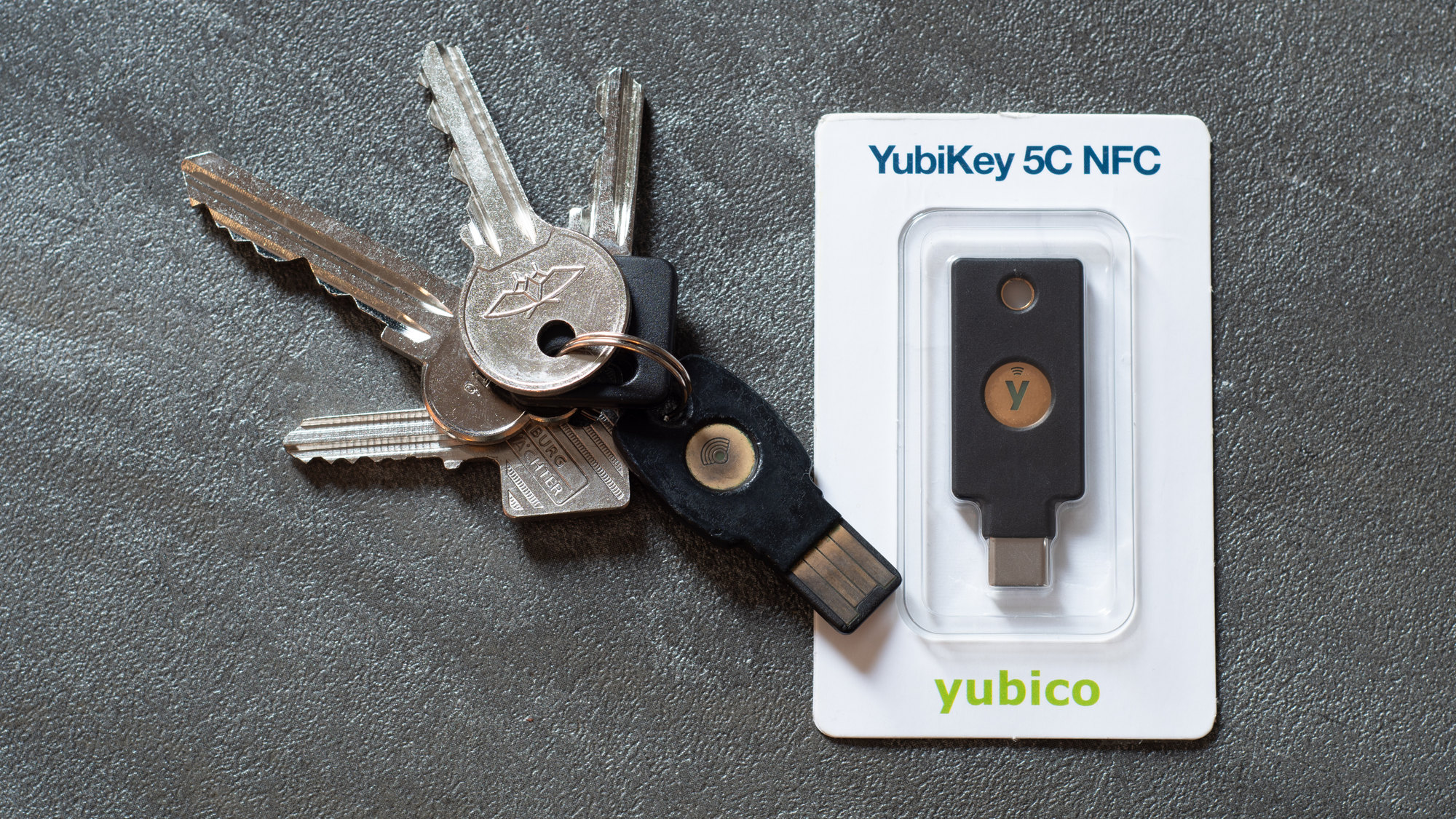
To prevent eavesdropping between the authenticator and the browser, the CTAP2 hmac-secret specification wraps the entire salt-and-output exchange in an ephemeral Diffie-Hellman encrypted tunnel negotiated specifically for that transaction:
- **Step 1: Credential Creation (
authenticatorMakeCredential)**: When the web application registers a new passkey withextensions: { prf: {} }, the browser setshmac-secret: truein the CTAP2 command. Inside its tamper-resistant secure element, the authenticator generates a 32-byte random secret (CredRandom) alongside theP-256orEd25519signing key pair. While CTAP2 defines two internal secrets (CredRandomWithUVandCredRandomWithoutUV), the W3C WebAuthn Level 3prfspecification mandates that browsers expose only the User-Verified PRF (uv=1). An attacker who snatches an unlocked YubiKey from your desk cannot generate your encryption key with a simple tap; they must also satisfy the biometric scan or hardware PIN. - Step 2: Ephemeral ECDH Key Agreement: During sign-in (
authenticatorGetAssertion), the browser queriesauthenticatorClientPIN(getKeyAgreement) to obtain the authenticator's ephemeralP-256public key, generates its own ephemeral key pair, and runs Elliptic Curve Diffie-Hellman (ECDH) to establish a one-timesharedSecretknown only to the browser and the security key. - **Step 3: Encrypting the Salt Input (
saltEnc)**: The browser encrypts the 32-bytesalt1(or 64 bytes ifsalt2is also requested) usingAES-256-CBCunder the ephemeralsharedSecret, attaches anHMAC-SHA-256authentication tag (saltAuth), and sends the bundle to the authenticator. - **Step 4: Hardware Evaluation and Encrypted Output (
outputEnc)**: Inside the secure element, the authenticator verifiessaltAuth, decryptssalt1, checks user verification, and computes:
$$\text{output}_1 = \text{HMAC-SHA-256}(\text{CredRandomWithUV}, \text{salt}_1)$$
The authenticator then encrypts output1 under the ephemeral sharedSecret, places the ciphertext into authenticatorData, and signs the assertion.
- Step 5: Client Decryption and Server Blindness: The browser decrypts
outputEncin local memory and exposes the 32-byte secret atassertion.getClientExtensionResults().prf.results.first. Meanwhile, even though the signedauthenticatorDatatravels to the remote web server to prove login authentication, the server never knows the local USB/NFC ephemeralsharedSecret. TheoutputEncbytes insideauthenticatorDataremain completely undecipherable to the server, preserving zero-knowledge separation end to end.
🧱 From Raw Entropy to AES-GCM: Why HKDF and Envelope Encryption Are Mandatory
Obtaining a 32-byte deterministic array from prf.results.first solves the passkey determinism problem, but security architects at Yubico, Bitwarden, 1Password, and the IETF warn against a perilous implementation mistake: never pass the raw 32-byte PRF output directly into an AES encryption cipher, and never encrypt user data directly with a passkey's output.
In formal cryptographic engineering, the 32-byte buffer returned by the WebAuthn PRF extension is classified as **Input Keying Material (IKM)**, not a finished cryptographic key. Treating raw IKM as a direct encryption key violates two foundational principles of production key management:
- Lack of Cryptographic Purpose Binding: A real-world encrypted application rarely needs just one key. It may need an
AES-256-GCMkey for encrypting vault records, a separate key for encrypting file attachments, and anHMACkey for verifying local integrity metadata. Passing the same raw bytes into multiple cryptographic primitives without domain separation violates key-isolation proofs. - The Lost Authenticator Catastrophe: Imagine an application that takes the key derived from your YubiKey or phone passkey and uses it directly to encrypt 10,000 personal photos and notes. Six months later, your phone is destroyed in an accident or you lose your YubiKey while traveling. Because every passkey credential generates its own unique, non-exportable
CredRandomat creation time, a newly purchased replacement YubiKey will produce a completely different 32-byte PRF output even when given the exact same salt. If your data was encrypted directly with the first passkey's PRF key, losing that authenticator means your data is mathematically unrecoverable forever.
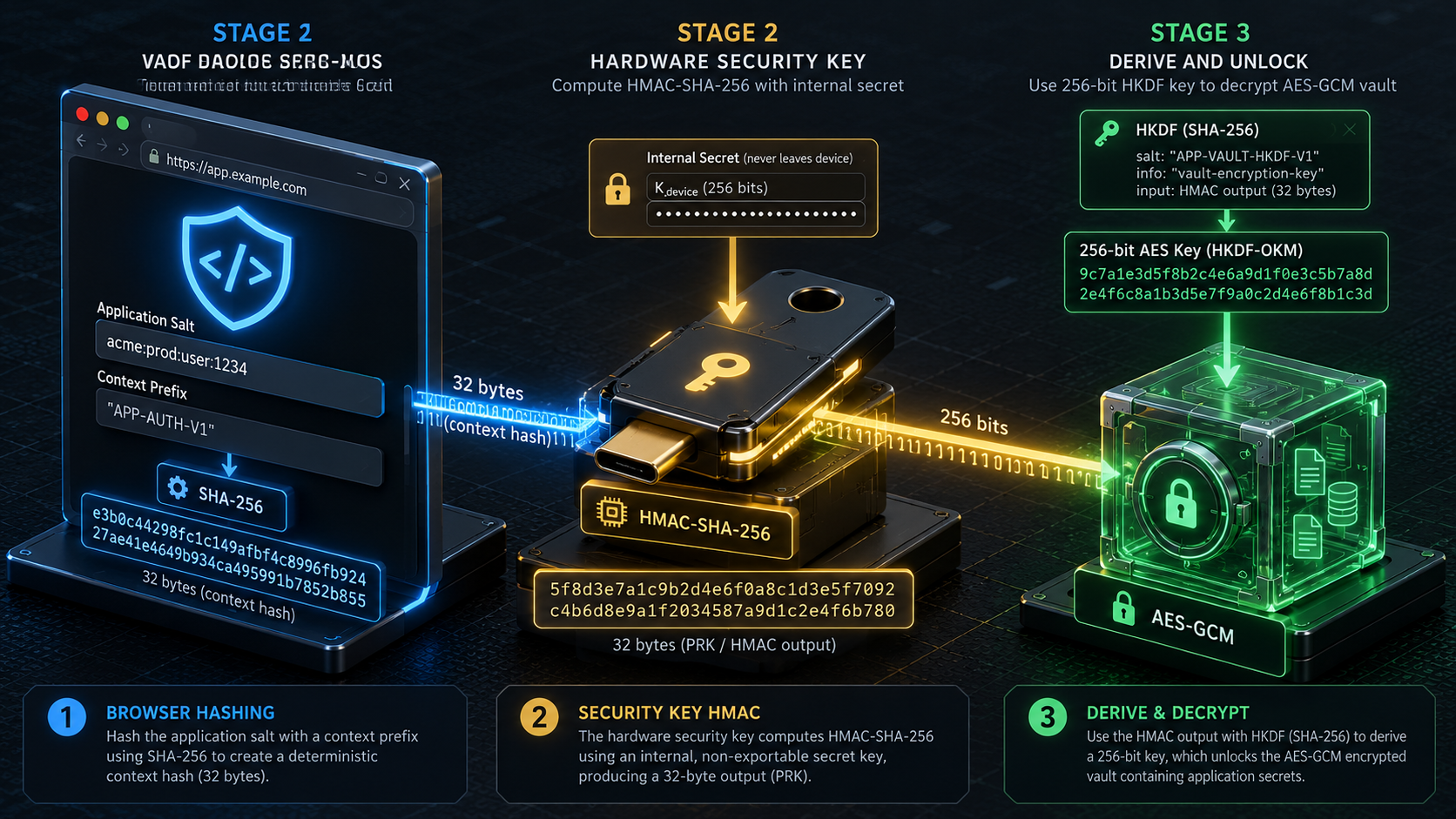
To solve both problems, modern zero-knowledge applications combine **IETF RFC 5869 (HKDF, the HMAC-based Extract-and-Expand Key Derivation Function) with a multi-tiered architecture known as Envelope Encryption**.
First, as implemented in the open-source European **wwWallet** keystore and Yubico's WebAuthn reference architecture, the browser immediately passes the raw 32-byte prfResults buffer into the native Web Crypto API (window.crypto.subtle.importKey) as a raw HKDF master key with extractable: false and usage restricted strictly to ['deriveKey']. Immediately after importKey resolves, the application overwrites the JavaScript ArrayBuffer holding the raw prfResults with zeroes.
Next, the application calls crypto.subtle.deriveKey() using HKDF with SHA-256 and an explicit, human-readable info parameter, such as new TextEncoder().encode("AES-GCM Vault Key Encryption Key V1"), to derive a non-extractable 256-bit AES-GCM CryptoKey. Because the resulting CryptoKey lives inside the browser engine's privileged cryptographic memory with extractable: false, JavaScript code can pass ciphertext buffers into crypto.subtle.decrypt(), but even if an attacker achieves arbitrary JavaScript execution via a third-party script vulnerability later in the session, they cannot call exportKey() to steal the raw key bytes.
🗝️ Preventing Data Loss with Envelope Encryption and Atomic Key Rotation
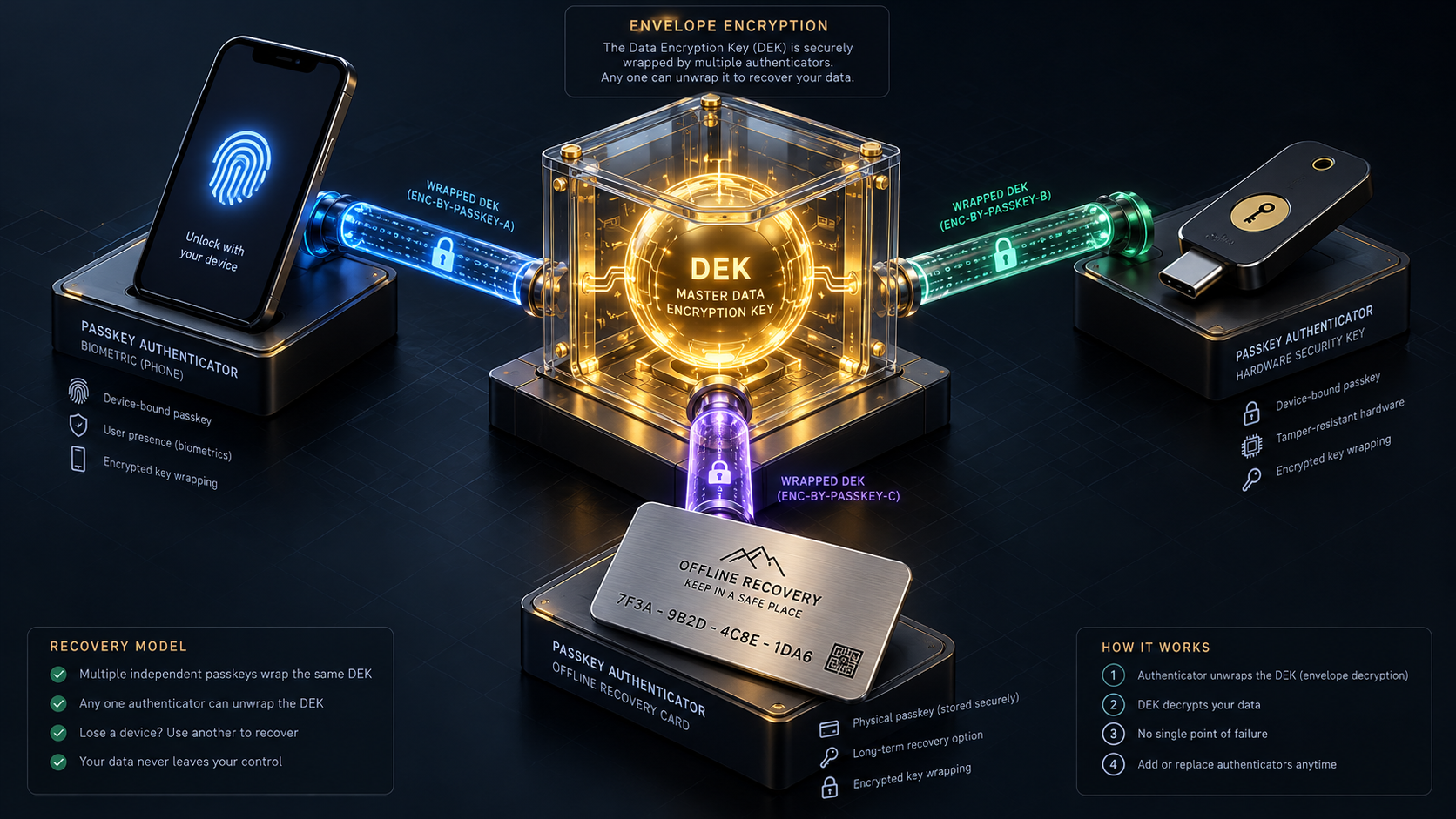
Second, to ensure that losing a phone or hardware key never destroys the user's vault, the application uses that HKDF-derived key as a **Key Encryption Key (KEK)** inside an Envelope Encryption hierarchy:
Envelope Encryption Architecture (Multi-Passkey & Recovery Ready):

                    [User's Vault Data / Notes / Passwords]
                                      |
                        Encrypted once via AES-256-GCM
                                      |
                 [Master Data Encryption Key (DEK / 256-bit)]
                   /                  |                   \
     Wrapped by KEK_1          Wrapped by KEK_2          Wrapped by KEK_3
            |                         |                         |
  [Passkey 1: Phone]       [Passkey 2: YubiKey]     [Emergency Recovery Kit]
  (via WebAuthn PRF)       (via WebAuthn PRF)       (via Argon2id / PBKDF2)
Here is how Envelope Encryption makes passkey-based zero-knowledge storage resilient in daily life:
- **The Data Encryption Key (
DEK)**: When you initialize your account, your browser generates a random 256-bit symmetric key (theDEK). Every note, password, and document in your vault is encrypted with thisDEK. - **Wrapping the
DEKwith Passkey 1 (KEK_1)**: When you register your primary passkey, the browser evaluates the PRF extension, runsHKDFto produceKEK_1, and usesKEK_1to encrypt (wrap) the 32-byteDEK. That tiny encrypted package (Wrapped_DEK_1) is uploaded to the server alongside Credential ID 1. - **Adding Redundant Passkeys (
KEK_2,KEK_3)**: While your vault is unlocked, you register a backup YubiKey or a printed Emergency Recovery Code. The browser derivesKEK_2from the second passkey's PRF output, encrypts a second copy of the exact same 32-byteDEK(Wrapped_DEK_2), and stores it alongside Credential ID 2.
When you sign in on any device and tap Passkey 1, the server sends Wrapped_DEK_1, your passkey computes KEK_1 via PRF, and your browser unwraps the DEK in milliseconds to decrypt your vault. If you lose Passkey 1 on a trip, you sign in using Passkey 2, which computes KEK_2 via PRF and unwraps Wrapped_DEK_2 to recover the exact same DEK. You can then delete Passkey 1 and Wrapped_DEK_1 from your account settings, revoking the lost key without re-encrypting your vault data.
Better still, the W3C WebAuthn Level 3 specification engineered a built-in mechanism for atomic key rotation aligned with **NIST SP 800-57** guidelines. Because the prf.eval input dictionary accepts two salts simultaneously (first and second), an application rotating a user's KEK from salt_v1 to salt_v2 passes first: salt_v1 and second: salt_v2 in a single navigator.credentials.get() call. With one biometric touch, the authenticator returns both results.first and results.second, allowing the browser to unwrap the DEK with the old key and re-wrap it under the new key in one transaction.
🔓 How Bitwarden, 1Password, and Digital Wallets Deploy PRF Today
The transition of WebAuthn PRF from W3C working drafts to daily consumer software is already transforming how major security platforms handle authentication and vault decryption.
In Bitwarden, users logging into the web vault or the Chromium browser extension can register up to five passkeys on free plans (and up to ten on paid plans) with the "Use for vault encryption" toggle enabled. According to Bitwarden's published security documentation, when a user registers a PRF-compatible passkey for vault encryption, the Bitwarden client executes a multi-stage cryptographic ceremony:
- The authenticator generates the WebAuthn authentication key pair and evaluates the
prfextension using Bitwarden's salt to produce a deterministic 32-byte PRF symmetric key. - The Bitwarden client generates an asymmetric PRF public/private key pair inside the browser.
- The client uses the PRF public key to encrypt the user's primary Bitwarden Account Encryption Key, and uses the authenticator's PRF symmetric key to encrypt the PRF private key.
- The client uploads the passkey credential ID, the WebAuthn public key, the PRF public key, the PRF-encrypted Account Encryption Key, and the PRF-encrypted private key to Bitwarden's servers.
When the user returns to a locked Bitwarden session and clicks "Log in with passkey", they skip the email field, the master password prompt, and the separate two-step login screen entirely. Presenting their YubiKey or biometric passkey satisfies WebAuthn authentication and simultaneously regenerates the PRF symmetric key locally. That symmetric key decrypts the PRF private key, which in turn decrypts the Account Encryption Key and unlocks the entire password vault in a single step. If a user registers a passkey on an authenticator that does not support the prf extension, Bitwarden degrades gracefully: the passkey still logs the user in without an email or 2FA code, and Bitwarden then prompts for the master password solely to decrypt the vault.
1Password has expanded PRF from the opposite direction as well: turning the password manager itself into a PRF-capable passkey provider. In addition to exploring passkey-based account unlocking, 1Password built full WebAuthn PRF support into its open-source Rust passkey libraries (passkey-crates), its browser extension, and its mobile apps for Android and iOS. When you save a third-party website's passkey inside your 1Password vault, 1Password generates and stores the credential's internal PRF key alongside the passkey. When you visit an end-to-end encrypted web application and sign in with the passkey saved in 1Password, 1Password combines the web app's salt with that third key and returns the deterministic 32-byte shared secret to the browser, allowing developers to build zero-knowledge apps without forcing users to memorize another password.
Meanwhile, in European public infrastructure, the open-source **wwWallet** project, developed under Germany's SPRIND FUNKE challenge for the **European Digital Identity (EUDI) Wallet framework, uses WebAuthn PRF as the root of its non-custodial citizen identity architecture**. By deriving the wallet's AES-GCM keystore encryption key on demand from the citizen's FIDO2 security key or platform passkey via prf and HKDF, wwWallet stores only encrypted credential blobs on the server while keeping the citizen experience as simple as unlocking a phone with a fingerprint.
🧭 Platform Compatibility Reality Check and What You Should Configure
Before you retire your written master password recovery sheet and rely on a passkey to decrypt your digital life, it is essential to understand where the hardware, operating system, and browser ecosystem stands today. Because a WebAuthn prf call must pass cleanly through the Web Browser Engine, the Operating System WebAuthn Platform API, and the Authenticator Firmware or Passkey Sync Provider, compatibility depends on the exact combination you use.
Here is the verified technical landscape across major platforms and authenticators in 2026:
- Chromium-Based Browsers (Google Chrome, Microsoft Edge, Brave, Vivaldi, Opera): Deliver the most mature implementation of the WebAuthn
prfextension across Windows, macOS, Linux, and Android, supporting bothevalandevalByCredential, enforcing the"WebAuthn PRF"SHA-256context prefix, and bridginghmac-secretcommands seamlessly to USB/NFC hardware keys and platform credential managers. - FIDO2 Hardware Security Keys (YubiKey 5 Series, YubiKey Bio Series, Nitrokey 3, Token2): Almost universal support at the hardware protocol level because CTAP2
hmac-secrethas been standard on FIDO2 security keys for years, provided the browser and host operating system pass the extension through to the USB or NFC interface. - Synced Passkey Providers (1Password, Google Password Manager, iCloud Keychain): Support evaluating the
prfextension directly from synced passkeys on modern Android, iOS/macOS, and Chromium desktop environments. Note the architectural trade-off: a synced passkey's PRF root secret travels through the provider's encrypted cloud sync fabric, whereas a hardware security key'sCredRandomis permanently air-gapped inside a physical secure element chip. - Apple WebKit / Safari and Roaming Hardware Keys: While Apple added
prfsupport for platform passkeys stored in iCloud Keychain across modern iOS, iPadOS, and macOS releases, external roaming FIDO2 security keys (such as a YubiKey connected via USB-C or NFC) have faced a longstanding limitation in WebKit's platform CTAP bridge (tracked in WebKit Bugzilla#259934). As both Bitwarden and Yubico document in their guides, macOS users who want to unlock a PRF-encrypted vault using a physical YubiKey must currently perform that login inside a Chromium-based browser rather than Safari. - Windows Hello Platform Authenticator: Windows 11 supports CTAP2
hmac-secretfor external security keys and enterprise offline login, while older Windows 10 builds exhibit limitations when combining PRF evaluation with two-step login flows.
Whether you are an everyday user turning on passwordless vault unlocking or a software engineer integrating client-side encryption into a web application, three concrete practices will keep your data both accessible and impenetrable:
- Never Rely on a Single Authenticator for Encryption: Before disabling password prompts in any encrypted app, configure at least two independent decryption paths under its Envelope Encryption settings, such as a primary biometric passkey plus a backup physical FIDO2 security key or a printed offline Emergency Recovery Code.
- **Test Capability Before Prompting (
getClientCapabilitiesandprf.enabled)**: Useawait PublicKeyCredential.getClientCapabilities("public-key")to check whethercaps.extensions?.includes("prf")is supported, and verifynewCredential.getClientExtensionResults()?.prf?.enabled === trueafter registration, falling back cleanly to a recovery passphrase when unavailable. - Use Unique Per-Credential Salts and Non-Extractable Web Crypto Keys: Generate a random 32-byte salt per credential (
evalByCredential), import the 32-byte PRF output intocrypto.subtle.importKey('raw', prfOutput, 'HKDF', false, ['deriveKey']), derive anAES-GCM256-bit key with an explicitinfocontext label, and zero out the temporary buffer.
For more than a decade, strong security on the web forced an uncomfortable choice: you could enjoy the effortless, phishing-proof speed of hardware passkeys, or you could protect your private files with zero-knowledge end-to-end encryption, but combining the two meant falling back to a typed master password. By teaching authenticators to compute a deterministic, domain-isolated secret inside their secure hardware without ever exposing the root key, the WebAuthn PRF extension closes the final gap in passwordless cryptography. The passkey no longer just vouches for your name at the front gate. It turns the heavy steel bolt on your private vault.
*Sources: W3C Web Authentication (WebAuthn) Level 3 Specification: Section 10.1.4 Pseudo-random function extension (prf), FIDO Alliance Client to Authenticator Protocol (CTAP) v2.1: Section 12.5 HMAC Secret Extension, Yubico Developers: A Developer's Guide to Deriving Keys with WebAuthn PRF and YubiKeys, Yubico Developers: Under the Hood, A Security Deep Dive into CTAP2 hmac-secret, Bitwarden Official Blog: PRF WebAuthn and its role in passkeys, Bitwarden Help Center: Log in with Passkeys, 1Password Blog: 1Password can now encrypt data using your saved passkeys, and IETF RFC 5869: HMAC-based Extract-and-Expand Key Derivation Function (HKDF).*